
Getting Started
How to set up, configure and test proxies.
Welcome to the official PXYEDGE documentation center. Here you will find configuration guides, tutorials, and technical reference to help you set up, configure, and maximize the performance of our premium proxy services.
How to set up, configure and test proxies.
Tutorials for location targeting, sessions and whitelist options.
Endpoint references and automation examples.
Troubleshooting and frequently asked questions.
If you register an account with Pxyedge on behalf of a company, you may be eligible for a free trial period and can receive trial traffic for connection testing and evaluation.
Trial bandwidth and available regions may vary depending on account type, verification status and current availability.
Make a request to using a residential proxy from a random location through our entry. Replace USERNAME and PASSWORD with your proxy user credentials. Keep in mind that each request returns a new IP address as PXYEDGE Rotating Residential Proxies rotate automatically. Our Residential Proxies support HTTP, HTTPS, and SOCKS5 protocols.
Here is an example of a basic request that goes through a proxy from a random location:
curl -x socks5://USERNAME-zone-custom-region-US:PASSWORD@128.14.209.70:3000 ipinfo.ioNote: Replace USERNAME and PASSWORD with your actual proxy credentials.
Here is another example of a request that goes through a proxy from California, United States. Adding region-US-st-CA to the username string enables you to specify a state.
curl -x socks5://USERNAME-zone-custom-region-US-st-CA:PASSWORD@128.14.209.70:3000 ipinfo.ioIf you need to keep the same proxy for more than one request, use a session control. Add session-abcd1234 to your username string, where abcd1234 can be any random string, and as long as you keep sending requests with this string (session ID), you will get the same proxy IP.
curl -x socks5://USERNAME-zone-custom-session-abcd1234:PASSWORD@128.14.209.70:3000 ipinfo.ioIf you have any additional questions, please contact our support team at service@pxyedge.com.
This section explains how to make requests, configure location targeting, control sessions and whitelist IPs when using rotating residential proxies.
Residential proxies can be used through standard HTTP clients, browsers, scraping frameworks and automation tools. They appear as real users and help reduce blocks during automated collection.
Build a request with authentication and optional location parameters.
| Parameter | Description |
|---|---|
| youraccount | Proxy account youraccount |
| zone | Name for IP pool |
| region | Country/region, random region without this parameter |
| st | The state you want to specify |
| city | The city you want to specify |
| session | Session string for sticky IPs |
Adding a region flag to the authorization header enables country-level targeting. If the local IP pool is unavailable, traffic may be routed through a nearby available region.
region-US
region-BR
region-IN
region-GB
region-CA
region-AU
All countries are in uppercase abbreviations.For example, a proxy in Brazil can be requested with region-BR.
State targeting is useful when you need a more precise area within a country.
region-US-st-CA
region-US-st-NY
region-US-st-TX
For example, targeting California can use region-US-st-CA.
By default, generated sessions are valid for a period of time and support multiple requests. Reusing the same session helps keep one IP during multi-step automation.
youraccount-zone-session-random123
youraccount-zone-session-random123-sesstime-10
The same session value can be reused until the session expires or is actively released.
IP whitelisting allows you to access the residential proxy pool simply by connecting from an authorized IP. You can configure whitelist access in the dashboard.
{
  "code": 0,
  "data": {
    "whitelist": ["203.0.113.10"]
  }
}
Test Command :
curl -x socks5://youraccount-zone-custom:yourpassword@128.14.209.70:3000 https://ipinfo.io
(no location is specified, an IP will be assigned randomly.)
Basic CMD Format:youraccount-zone-custom:yourpassword
Test URL – @128.14.209.70:3000 https://ipinfo.io
If you want to specify a country, region, and session, the following parameters will be appended to the basic CMD format:
-region-country-st-region-session-yoursession-sessTime-minutes
Example command 1:
curl -x socks5://youraccount-zone-custom-region-country:yourpassword@128.14.209.70:3000 https://ipinfo.io
Example command 2:
curl -x socks5://youraccount-zone-custom-session-yoursession-sessTime-minutes:yourpassword@128.14.209.70:3000 https://ipinfo.io
Example command 3:
curl -x socks5://youraccount-zone-custom-region-country-st-region-session-yoursession-sessTime-minutes:yourpassword@128.14.209.70:3000 https://ipinfo.io
Parameter description:
For Example
youraccount: David Password: David1
Specify Country: Afghanistan(AF) Specify Region: Balkh(BAL)
Session: david0 Session Time: 5
Then the cmd will be generated :
curl -x socks5://David-zone-custom-region-AF-st-BAL-session-david0-sessTime-5:David1@128.14.209.70:3000 https://ipinfo.io
(Select a "AF" IP and keep the session active for 5 minutes. By default, if the client disconnects, the IP will automatically change.)
(Some regions may currently have fewer active IPs online.
It is recommended to remove -st-region or try connecting to a different region.)
Official download: https://www.google.com/intl/en_us/chrome/
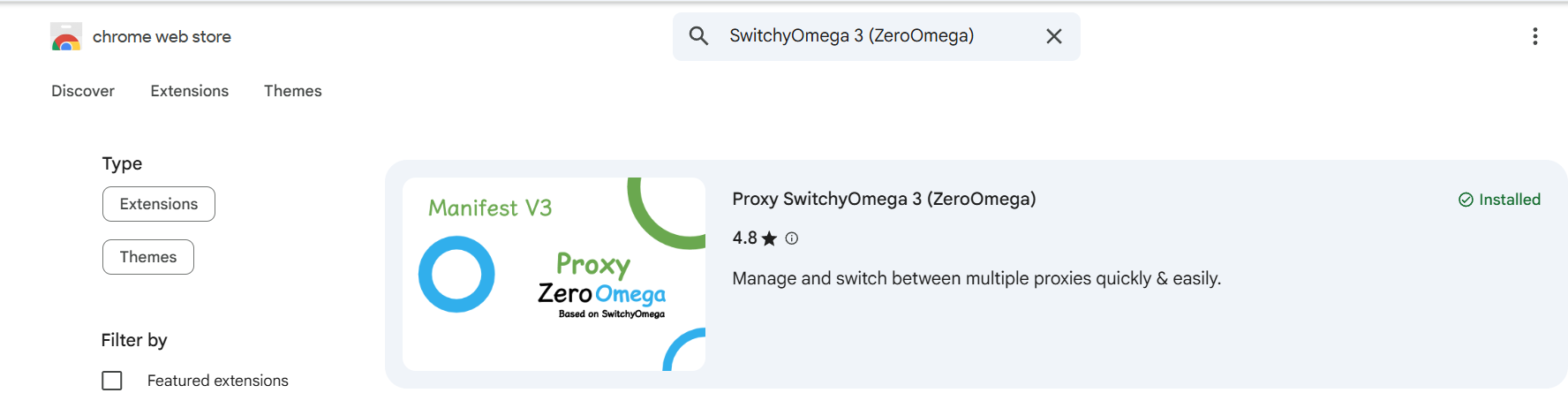
image1: ZeroOmega Extension in Chrome Web Store
Note: This add-on is maintained by a third-party developer. Make sure you trust the source before installing.
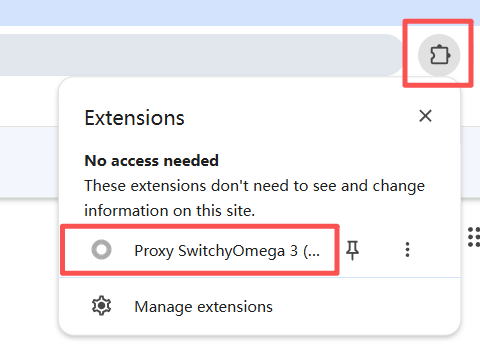
image2: Find Proxy SwitchyOmega in Extensions Menu
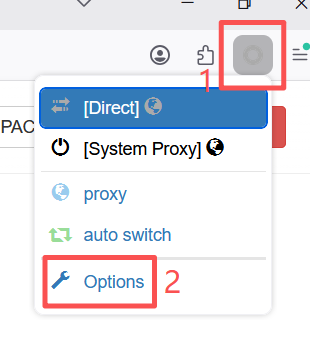
image3: Click Options in ZeroOmega Menu
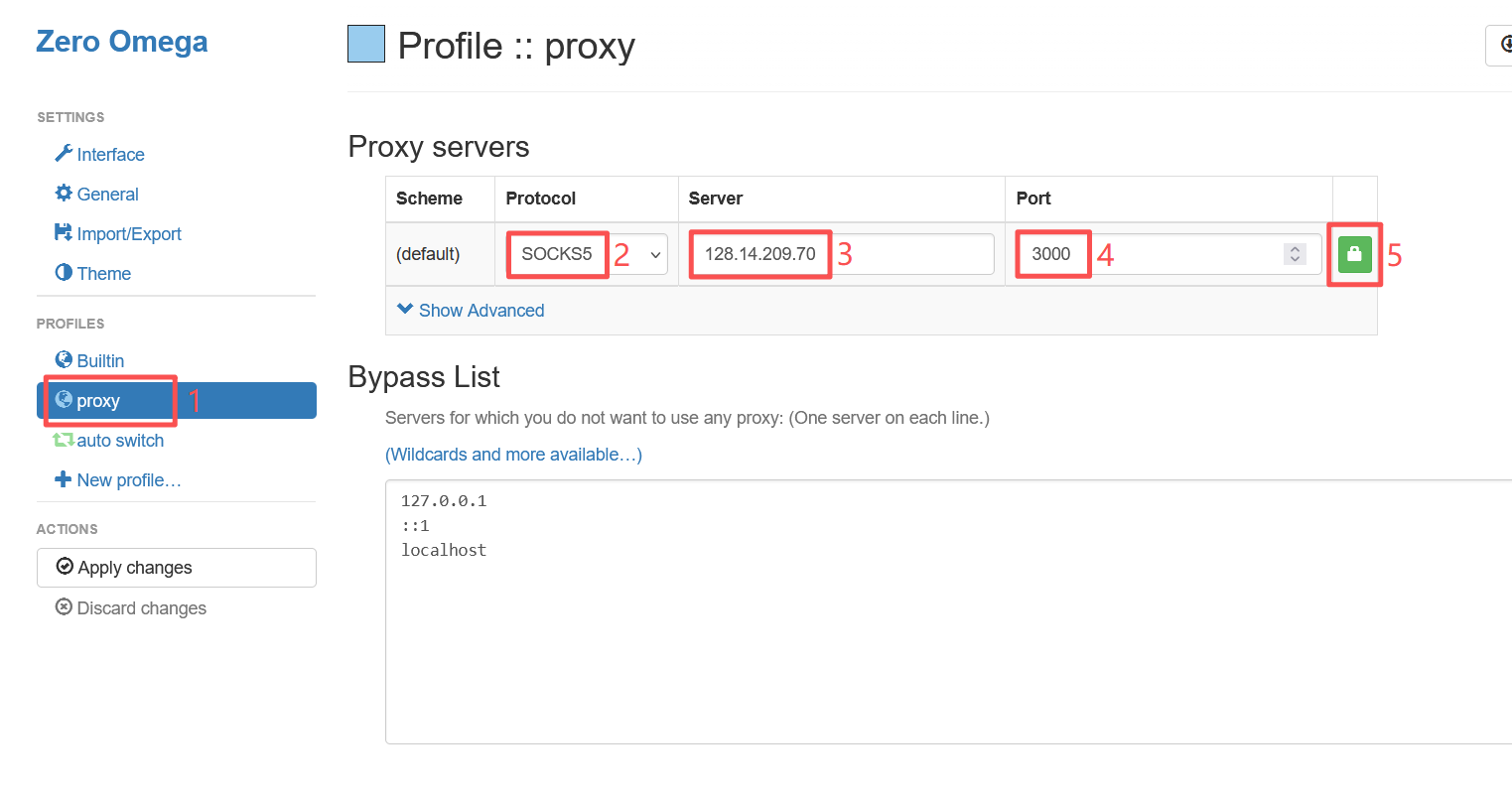
image4: Proxy Server Configuration Interface
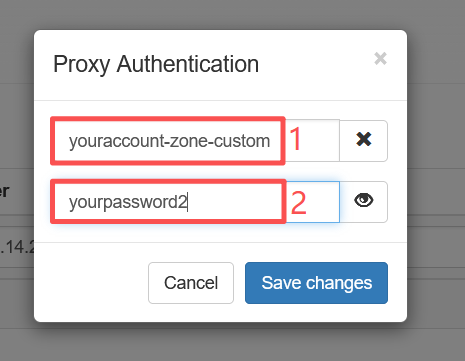
image6: Proxy Authentication Popup
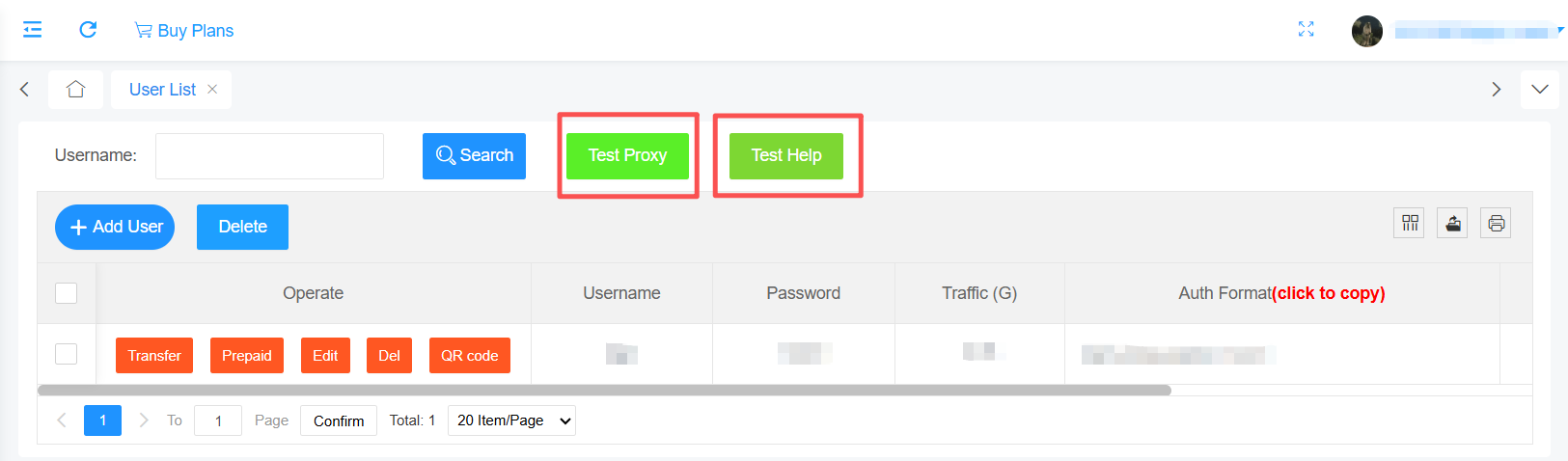
Important: Please strictly follow the account format requirements in the help documentation to fill in the username. Incorrect format will cause the proxy to not work properly.
Detailed instructions: https://pxyedge.com/documentation/Click-the-Test-Proxy
Click the "Apply changes" button in the left ACTIONS menu to save and apply all configuration changes.
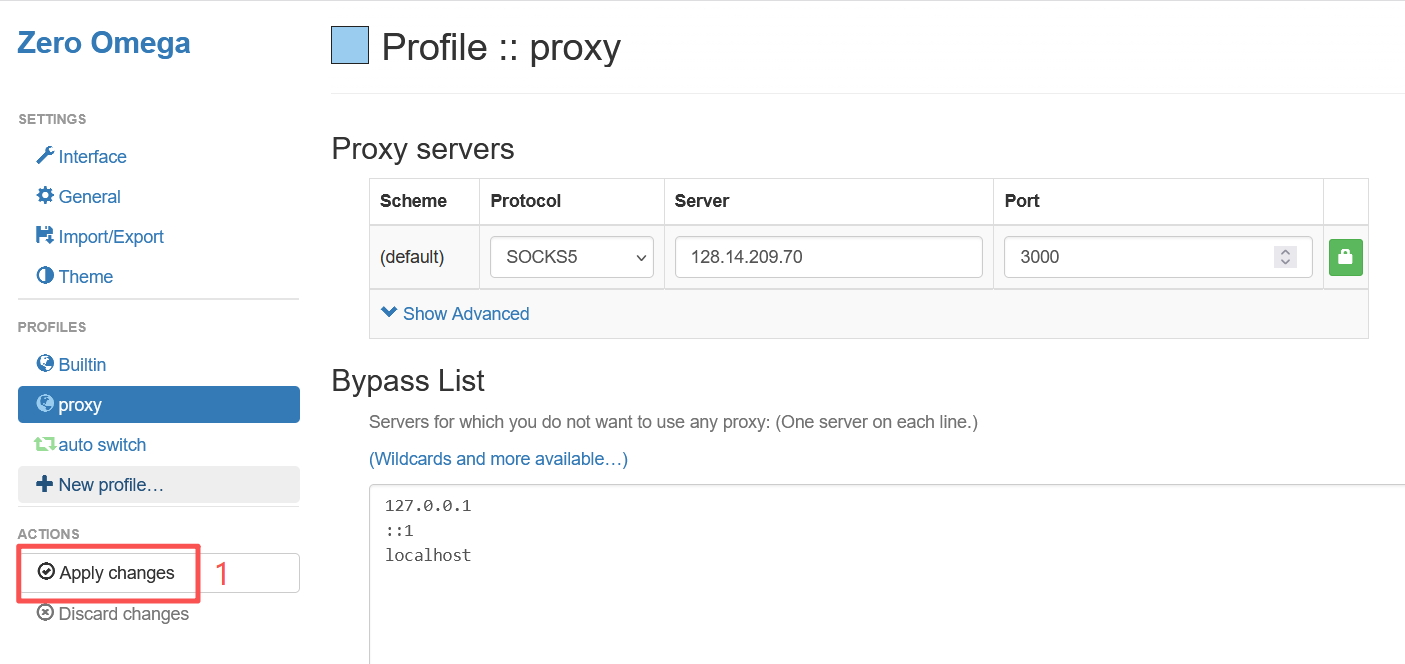
image7: Apply Changes Button
Click the Zero Omega icon in the Chrome toolbar, then select "proxy" to enable the proxy. Select "Direct" for direct connection without proxy.
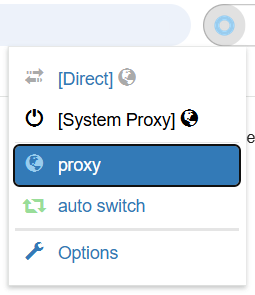
image8: Enable Proxy
Visit the following address to verify if the proxy is working:
https://ipinfo.io/what-is-my-ip
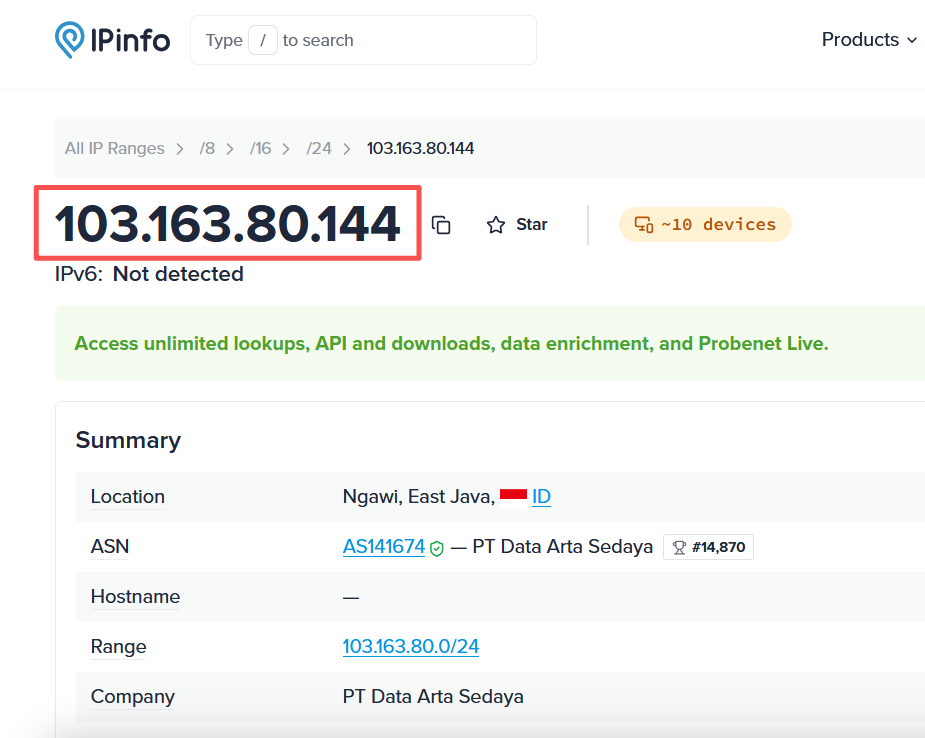
image9: IP Test Result on ipinfo.io
Verification Successful: If the displayed IP address matches the proxy server IP you configured, the proxy is successfully configured and working properly.
Official download: https://www.firefox.com
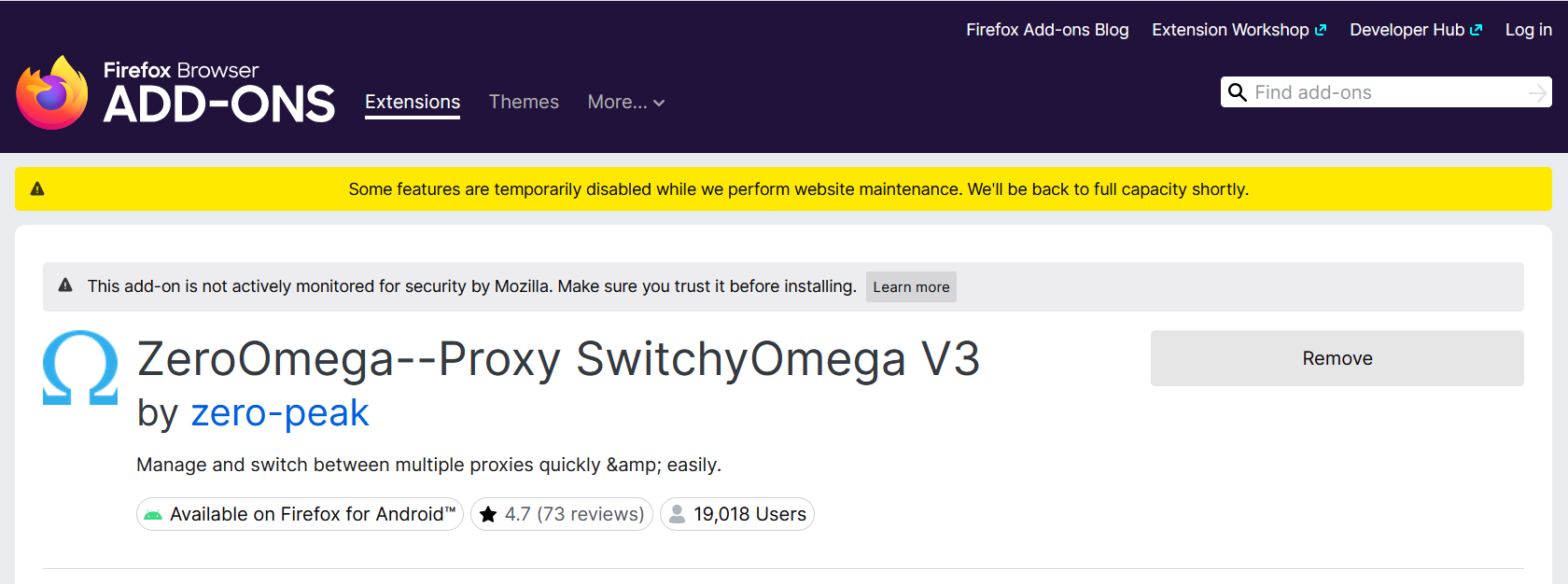
image1: ZeroOmega Extension Installation
Note: This add-on is maintained by a third-party developer. Make sure you trust the source before installing.
image2: Open Extension Settings
image3: Proxy Configuration Interface
image4: Authentication Interface
Important: Please strictly follow the account format requirements in the help documentation to fill in the username. Incorrect format will cause the proxy to not work properly.
Detailed instructions: https://pxyedge.com/documentation/Click-the-Test-Proxy
Click the "Apply Changes" button to save and apply all configuration changes.
image5: Apply Changes
Click the Zero Omega icon, select "proxy" to enable the proxy, select "Direct" for direct connection without proxy.
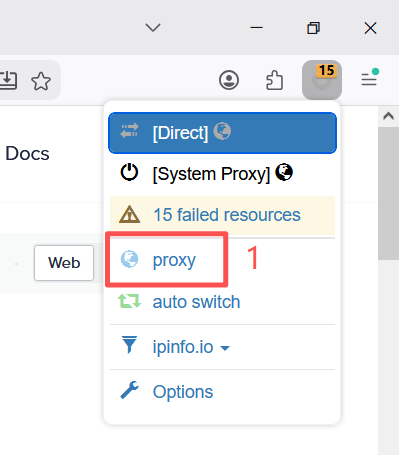
image6: Enable Proxy
Visit the following address to verify if the proxy is working:
https://ipinfo.io/what-is-my-ip
image7: IP Test Result
Verification Successful: If the displayed IP address matches the proxy server IP you configured, the proxy is successfully configured and working properly.
Use the API to query traffic usage, manage sessions, create authentication credentials and retrieve proxy endpoint information.
Query account traffic usage through API for reporting or billing integration.
http://128.14.209.70:1030/keep/api/consume/user?account=&password=&dayTime=Parameter description:
| param name | required | param type | description |
|---|---|---|---|
| account | No | String | login account |
| password | No | String | login password |
| dayTime | Yes(default current_date) | String | Format(yyyy-MM-dd, e.g. : 2026-01-12) |
Request example:
http://128.14.209.70:1030/keep/api/consume/user?account=top0&password=123456&dayTime=2026-01-13Return example:
{
  "code": 200,
  "data": {
    "balance": 9980.000000,
    "dayTime": "2026-1-13",
    "details": [
      {
        "account": "top0",
        "balance": 19.719692,
        "bytes": 94
      }
    ],
    "total": 94,
    "unit": "M"
  },
  "msg": "SUCCESS"
}
Return parameter description:
| param name | param type | description |
|---|---|---|
| Code | string | The return code, 200 indicates success, while others represent failure |
| Data | String | |
| balance | float | |
| details | Detailed statistics of traffic usage for each auth account | |
| total | Total data usage | |
| unit | Traffic unit, M represents Mega |
Release a session to force a fresh IP allocation on the next request.
http://128.14.209.70:1030/keep/api/session/release?account=&password=&session=Parameter description:
| param name | required | param type | description |
|---|---|---|---|
| account | No | String | login account |
| password | No | String | login password |
| session | No | String | Defines a string consisting only of letters and numbers, with a length ranging from 7 to 9 characters. |
Request example:
http://128.14.209.70:1030/keep/api/session/release?account=top0&password=123456&session=session001Return example:
{
  "code": 200,
  "msg": "SUCCESS"
}
Return parameter description:
| param name | param type | description |
|---|---|---|
| Code | string | The return code, 200 indicates success, while others represent failure |
| msg |
Create proxy authentication credentials or maintain whitelist entries through API.
Parameter description:
| param name | required | param type | description |
|---|---|---|---|
| account | No | String | login account |
| password | No | String | login password |
| aa | No | String | auth account |
| ap | No | String | auth password |
| ip | No | String | whitelist ip |
Request example:
http://128.14.209.70:1030/keep/api/create/auth?account=&password=&ip=1.1.1.1Return example:
{
  "code": 200,
  "msg": "SUCCESS"
}
Return parameter description:
| param name | param type | description |
|---|---|---|
| Code | string | The return code, 200 indicates success, while others represent failure |
| msg |
Query IP and client information for the current proxy account or whitelist entry.
Parameter description:
| param name | required | param type |
|---|---|---|
| account | No | String |
| password | No | String |
| zoneId | No | country id or region id |
| limit | No | get number |
Request example:
http://128.14.209.70:1030/keep/api/client/info?account=top0&password=123456&zoneId=120&limit=10Return example:
{
  "code": 200,
  "count": 10,
  "data": [
    { "clientInfo": "00ug611", "ip": "74.244.23.229" },
    { "clientInfo": "000oips", "ip": "69.110.141.47" },
    { "clientInfo": "00l0vnt", "ip": "73.170.62.71" },
    { "clientInfo": "00nqlii", "ip": "129.222.244.168" },
    { "clientInfo": "000m2co", "ip": "73.72.195.112" },
    { "clientInfo": "001cm1y", "ip": "107.210.29.22" },
    { "clientInfo": "00nw725", "ip": "98.30.162.26" },
    { "clientInfo": "00l351n", "ip": "47.156.73.40" },
    { "clientInfo": "00tpigg", "ip": "216.176.136.97" },
    { "clientInfo": "00ohudd", "ip": "35.151.63.13" }
  ],
  "msg": "SUCCESS"
}
Return parameter description:
| param name | param type | description |
|---|---|---|
| Code | string | The return code, 200 indicates success, while others represent failure |
| clientInfo | String | |
| Ip | String |
Retrieve proxy endpoint information for your current product package.
http://128.14.209.70:1030/keep/api/source?account=&password=&zoneId=&limit=Parameter description:
| param name | required | param type | description |
|---|---|---|---|
| account | No | String | login account |
| password | No | String | login password |
| zoneId | Yes | Int | state ID |
| Limit | Yes | Int | extracted quantity |
Request example:
http://128.14.209.70:1030/keep/api/source?account=test&password=test&zoneId=120&limit=10Return example:
{
  "code": 200,
  "count": 10,
  "data": [
    { "clientIp": "75.176.134.90", "proxyIp": "128.14.209.70", "proxyPort": 10211 },
    { "clientIp": "67.180.175.201", "proxyIp": "128.14.209.70", "proxyPort": 10213 },
    { "clientIp": "71.229.249.121", "proxyIp": "128.14.209.70", "proxyPort": 10214 },
    { "clientIp": "73.90.47.90", "proxyIp": "128.14.209.70", "proxyPort": 10215 },
    { "clientIp": "23.116.212.86", "proxyIp": "128.14.209.70", "proxyPort": 10217 },
    { "clientIp": "98.207.51.70", "proxyIp": "128.14.209.70", "proxyPort": 10218 },
    { "clientIp": "73.211.143.165", "proxyIp": "128.14.209.70", "proxyPort": 10225 },
    { "clientIp": "173.3.131.61", "proxyIp": "128.14.209.70", "proxyPort": 10230 },
    { "clientIp": "47.146.157.16", "proxyIp": "128.14.209.70", "proxyPort": 10231 },
    { "clientIp": "69.140.161.49", "proxyIp": "128.14.209.70", "proxyPort": 10232 }
  ],
  "msg": "SUCCESS"
}
Return parameter description:
| param name | param type | description |
|---|---|---|
| Code | string | The return code, 200 indicates success, while others represent failure |
| Count | string | quantity |
| Data | string | |
| clientIp | string | client IP |
| proxyIp | string | proxy IP |
| proxyPort | string | proxyPort |
Ten browser window environment, permanently free of charge, using the Google kernel depth development, can realize physical level simulation of the effect of the real machine information, proxy IP depth anonymization, 100% no connection between the browser window The proxy IP is deeply anonymized, and there is 100% no correlation between the browser windows, which highly guarantees the cleanliness of the browser environment, and it can open more browser windows, log in more accounts, and prevent correlation and blocking.
BitBrowser Website: https://www.bitbrowser.cn/
Before integrating a proxy into BitBrowser, make sure you have set up the proxy correctly to guarantee that the proxy service will work properly.
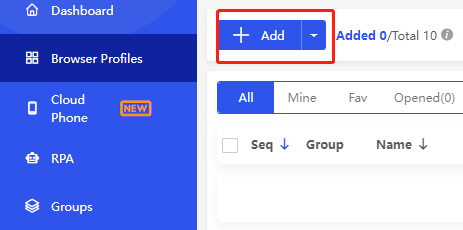
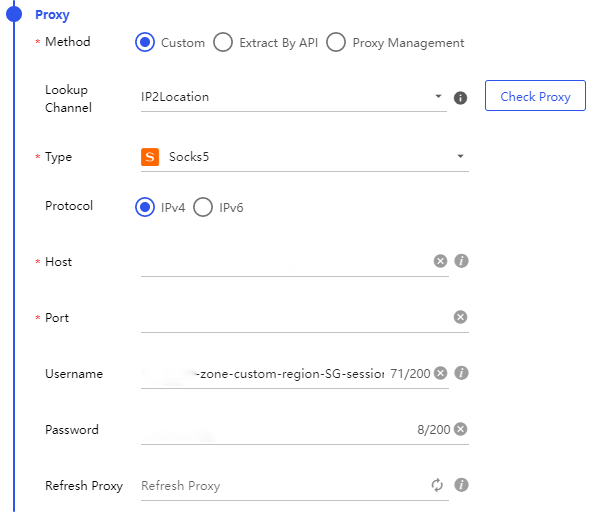
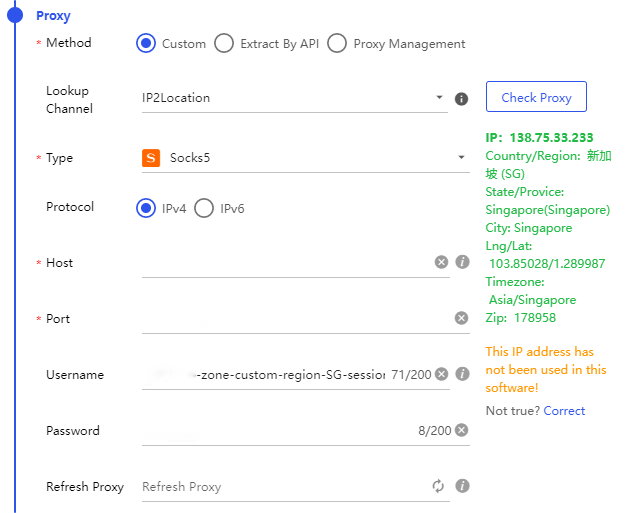
After completing the above steps, you can now use PxyEdge's proxies to access web pages in BitBrowser.
If you have any questions or suggestions during use, please feel free to contact us. We are glad to hear your thoughts and provide assistance!
AdsPower Official Website Registration:https://www.adspower.net
Before integrating the proxy into AdsPower, ensure your proxy is correctly set up to guarantee normal service operation.
For proxy configuration, please refer to: 【Help Documentation】
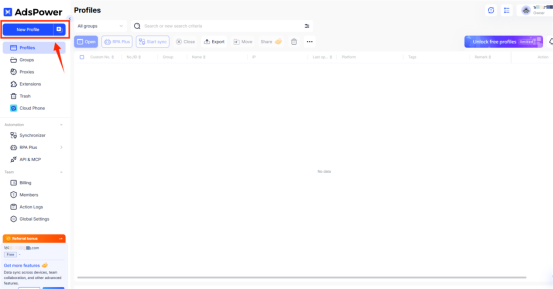
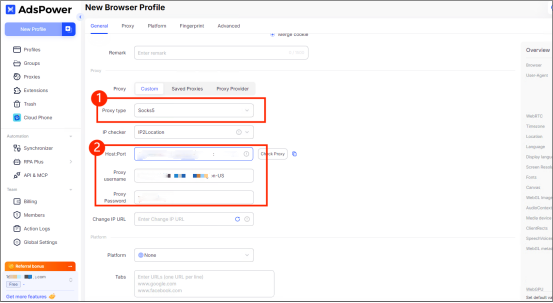
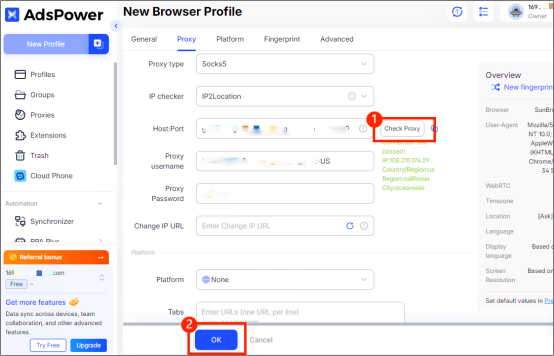
Now you can use pxyedge's proxies through AdsPower.
If you encounter any issues or have suggestions during use, please feel free to contact us. We are happy to hear your thoughts and provide assistance!
Incogniton is an anti-detect browser designed for secure multi-account management, offering proxy integration, team collaboration, and tools to safely run campaigns with minimal risk and maximum efficiency.
Official website: https://incogniton.com
Before integrating your proxy into Incogniton, please make sure your proxy has been properly configured to ensure that the service runs normally.
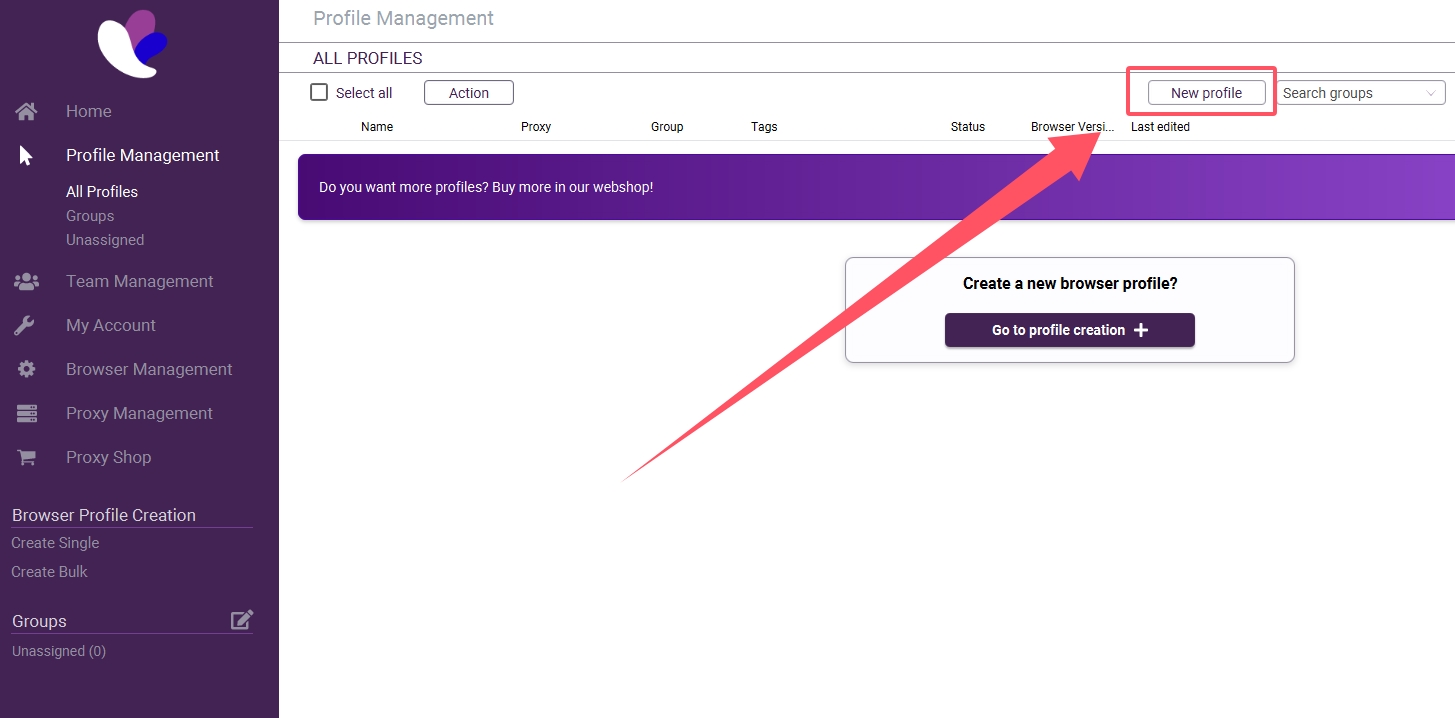
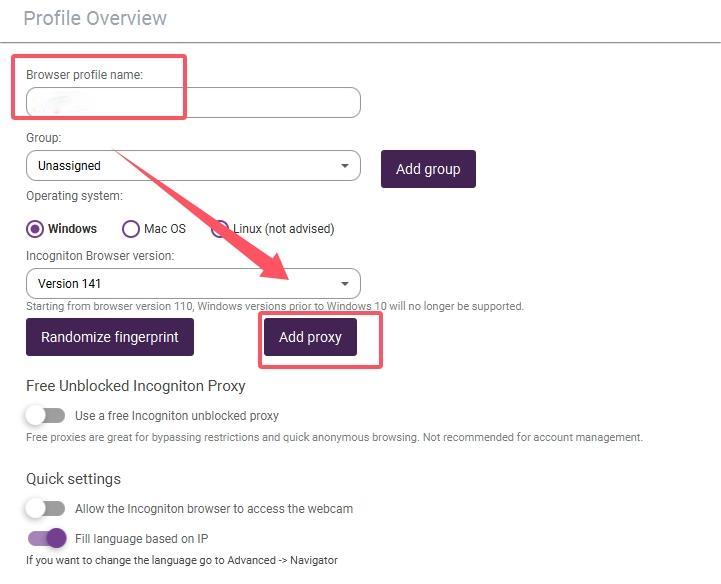
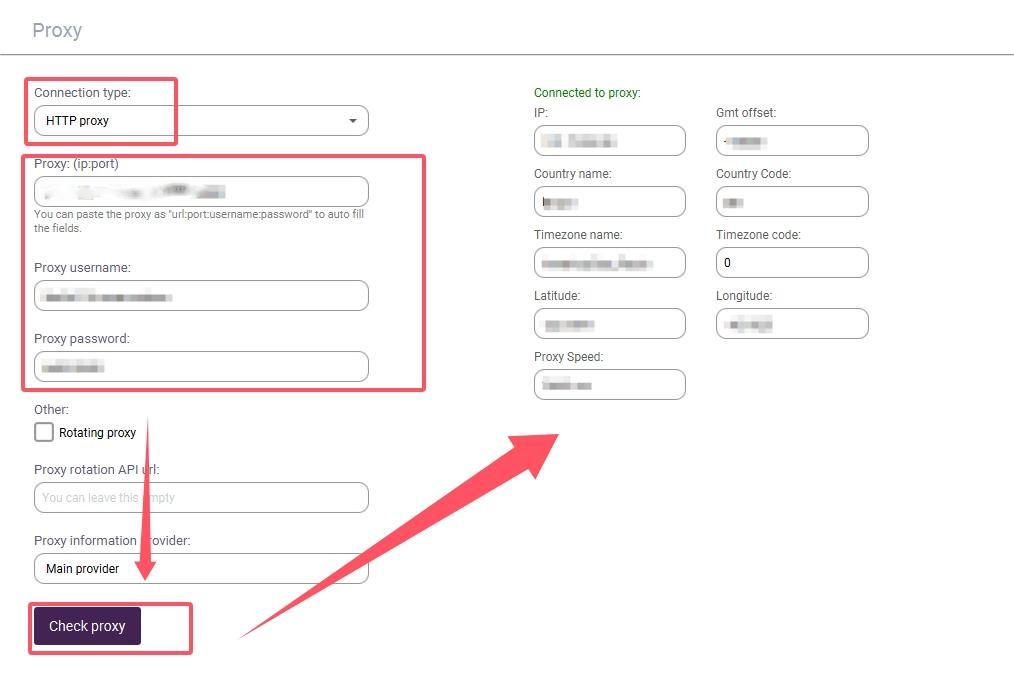
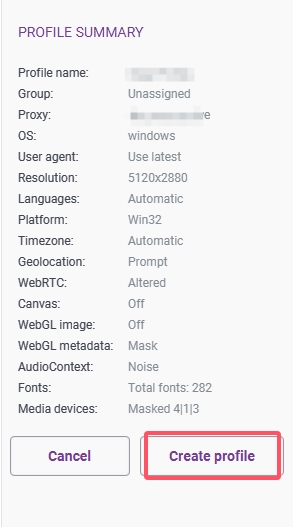
After completing the above steps, you can now use PxyEdge to access web pages in Incogniton.
If you have any questions or suggestions during use, please feel free to contact us. We are glad to hear your thoughts and provide assistance!
Before integrating a proxy into Hubstudio, make sure you have set up the proxy correctly to guarantee that the proxy service will work properly.
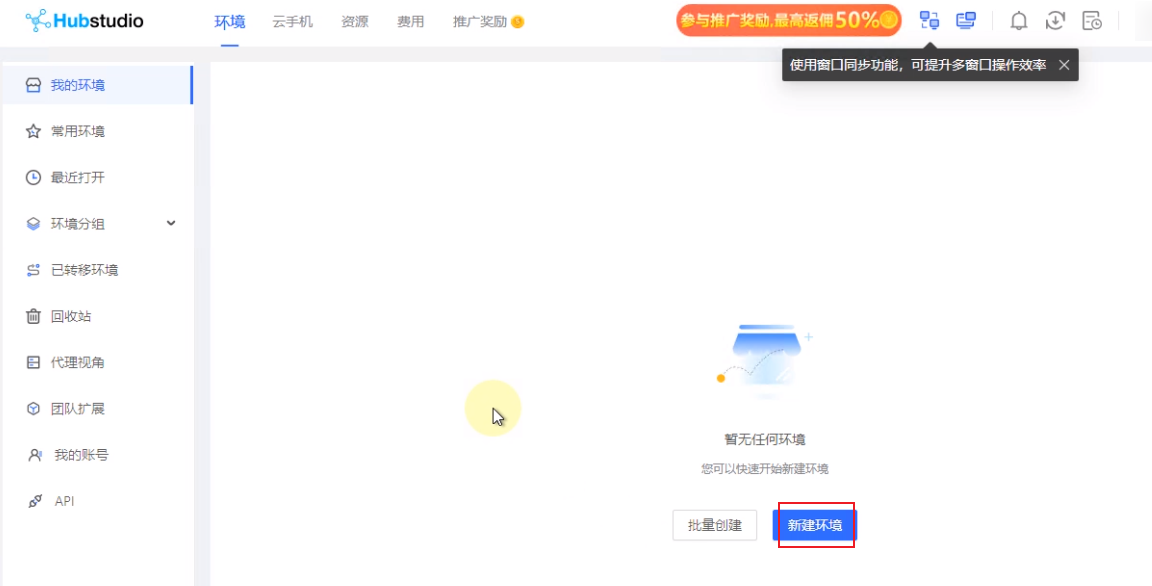
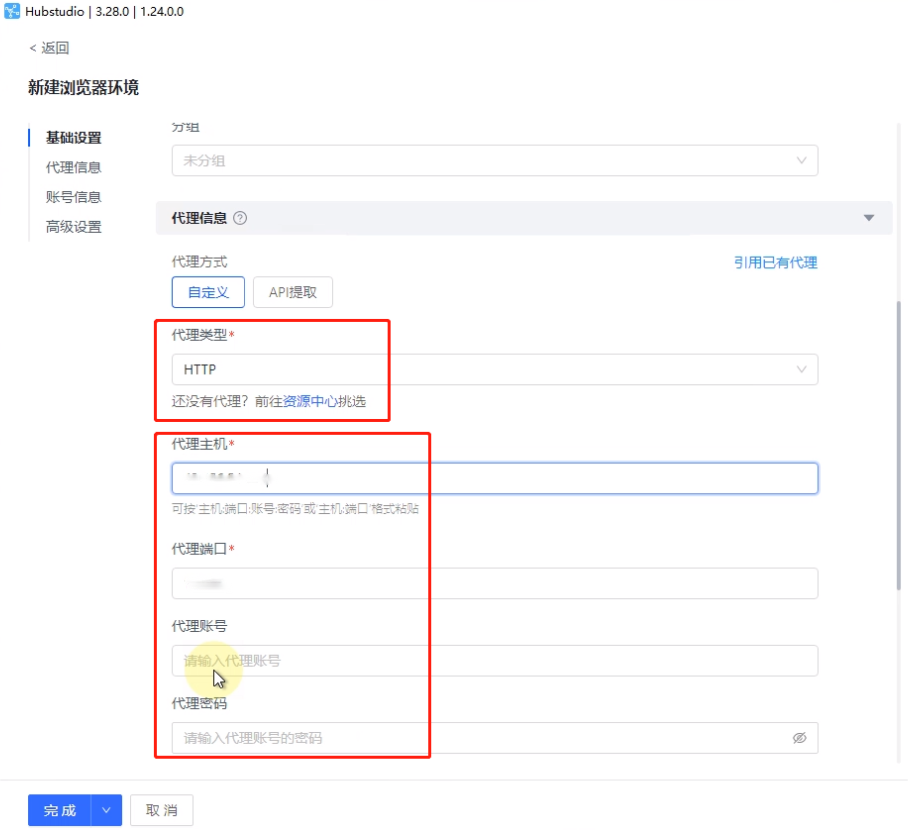
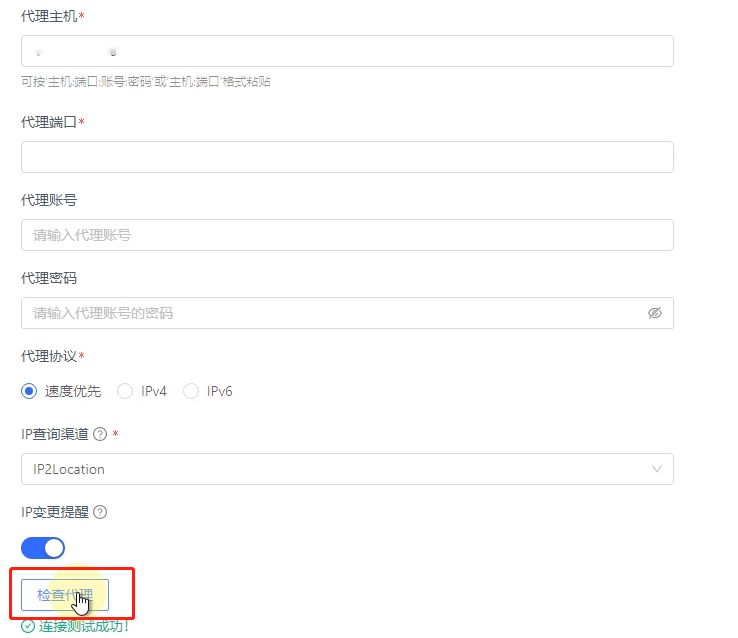
You are now ready to configuring Hubstudio through the PxyEdge website.
If you have any questions or suggestions during use, please feel free to contact us. We are glad to hear your thoughts and provide assistance!
Before integrating a proxy into MuLogin, make sure you have set up the proxy correctly to guarantee that the proxy service will work properly.
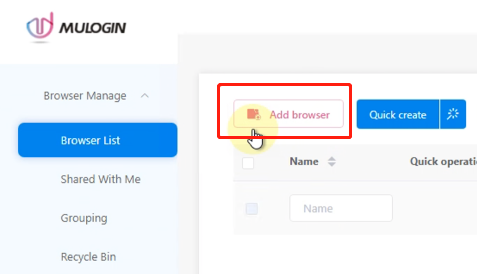
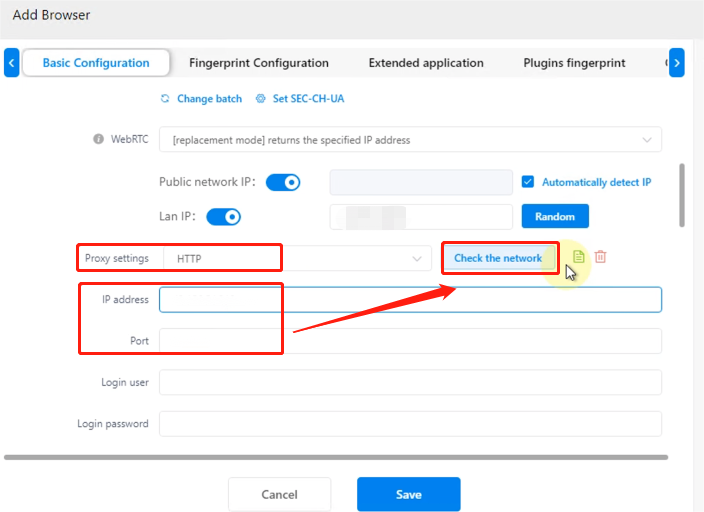
You are now ready to configuring MuLogin through the PxyEdge website.
If you have any questions or suggestions during use, please feel free to contact us. We are glad to hear your thoughts and provide assistance!
Before integrating a proxy into XLogin, make sure you have set up the proxy correctly to guarantee that the proxy service will work properly.
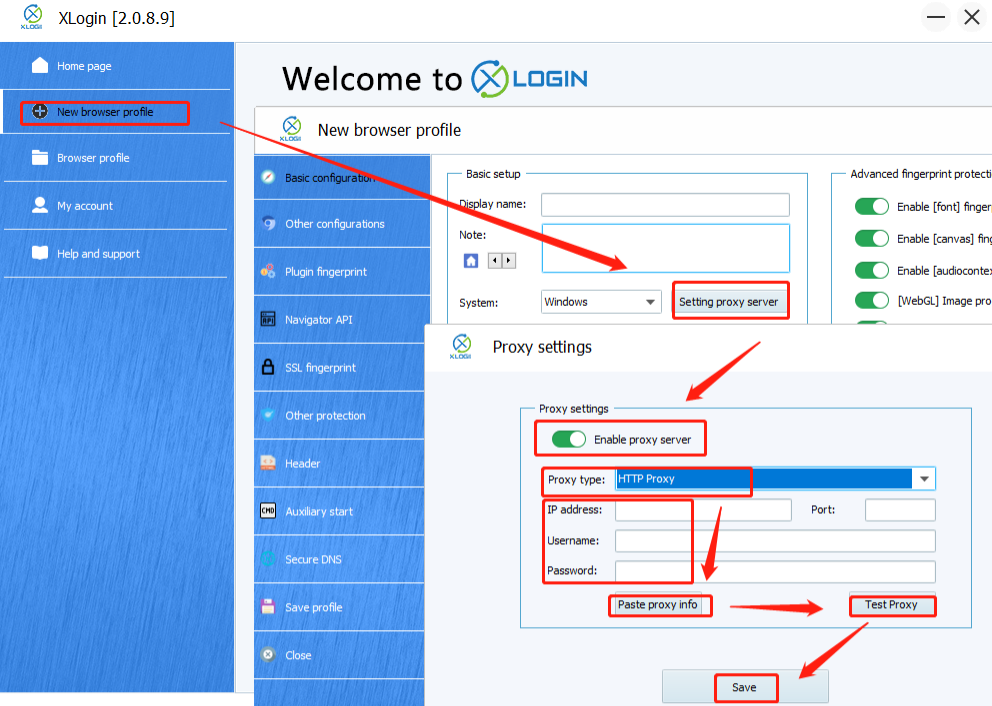
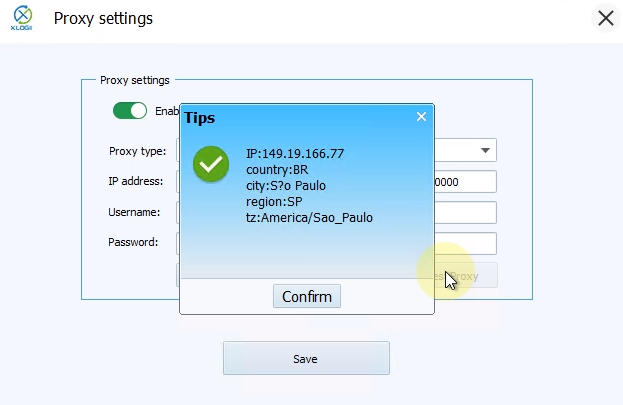
You are now ready to configuring XLogin through the PxyEdge website.
If you have any questions or suggestions during use, please feel free to contact us. We are glad to hear your thoughts and provide assistance!
Before integrating a proxy into YunLark, make sure you have set up the proxy correctly to guarantee that the proxy service will work properly.
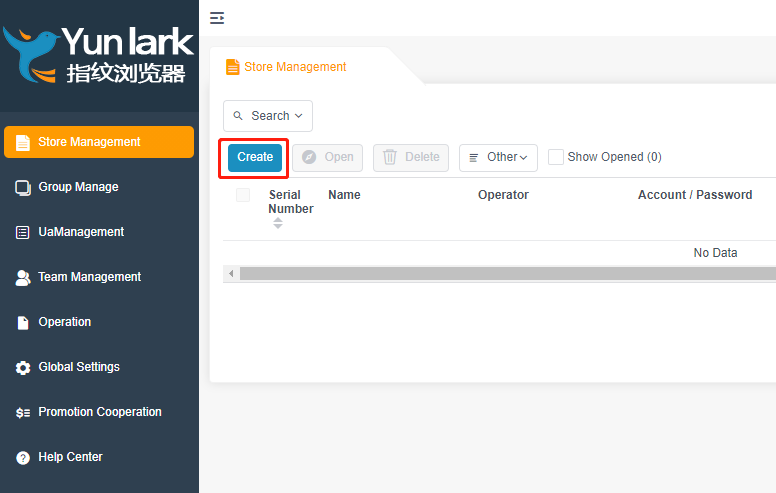
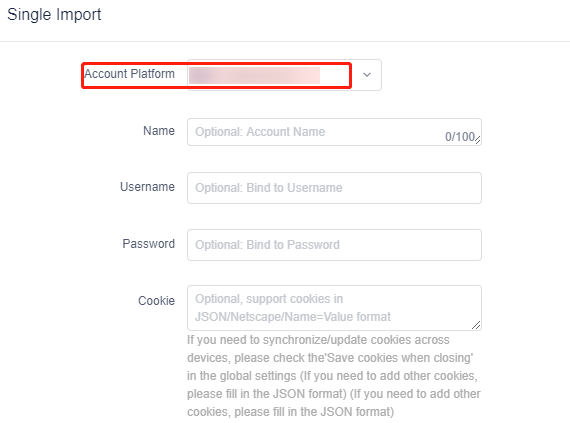
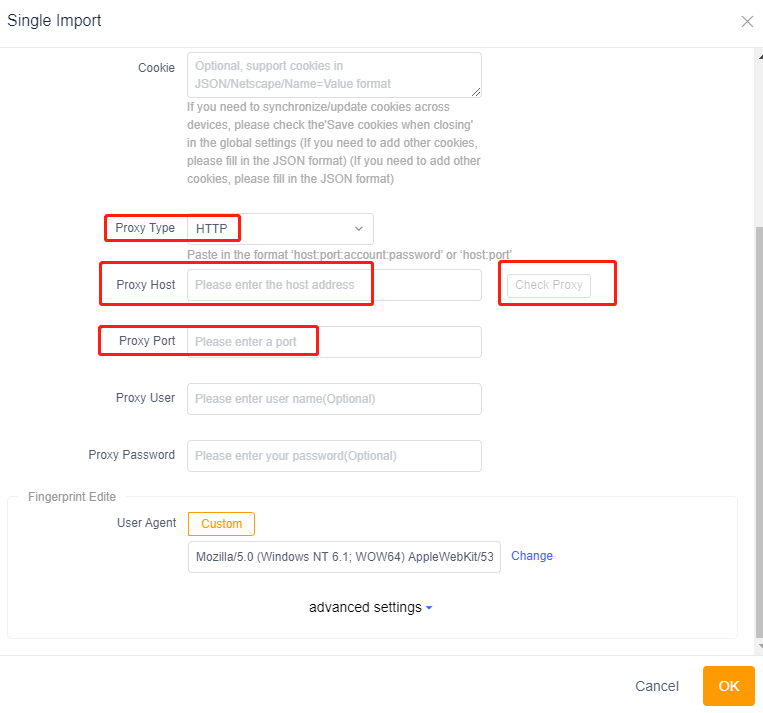
You are now ready to configuring YunLark through the PxyEdge website.
If you have any questions or suggestions during use, please feel free to contact us. We are glad to hear your thoughts and provide assistance!
Before integrating a proxy into VMLogin, make sure you have set up the proxy correctly to guarantee that the proxy service will work properly.
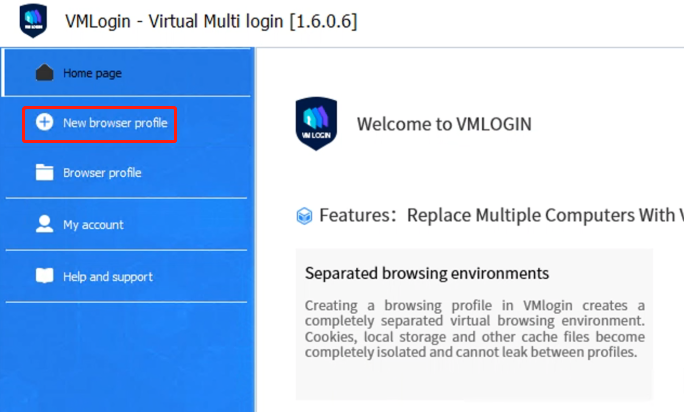
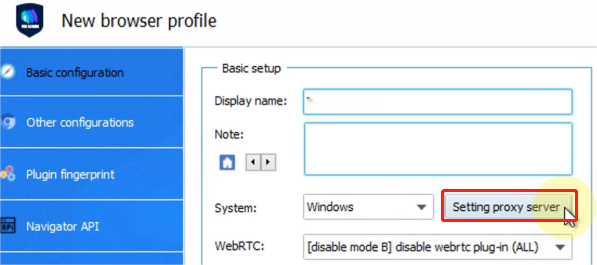
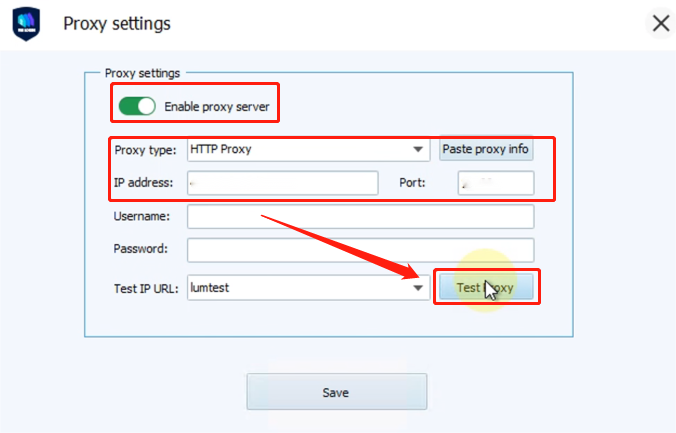
You are now ready to configuring VMLogin through the PxyEdge website.
If you have any questions or suggestions during use, please feel free to contact us. We are glad to hear your thoughts and provide assistance!
Before integrating proxies into Chrome, make sure you have set up the proxy correctly to guarantee that the proxy service will work properly.
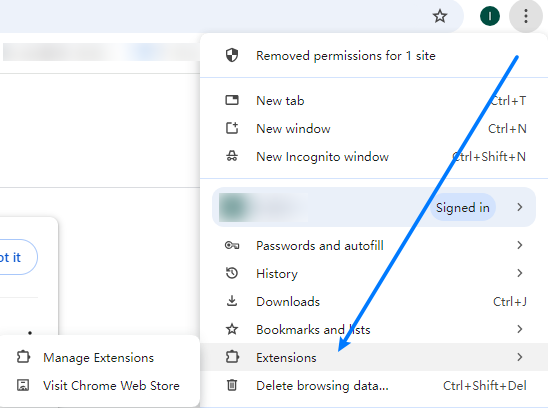
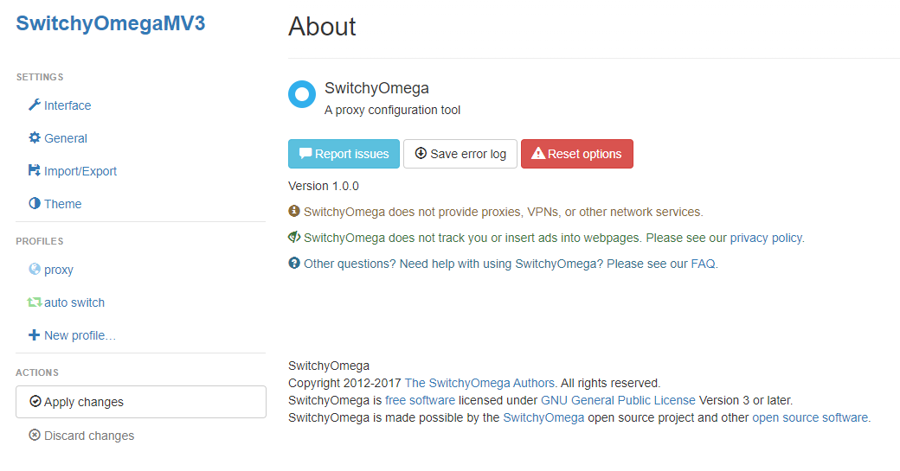
Through the above steps, you have successfully completed the integration of Chrome and proxy, providing a more secure and flexible option for network connection.
Before integrating a proxy into Firefox, please make sure you have set up the proxy correctly to guarantee that the proxy service will work properly.
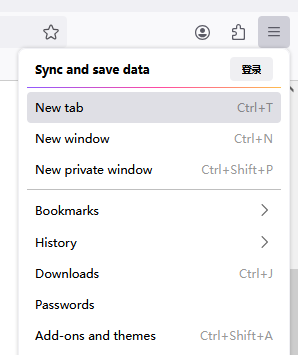
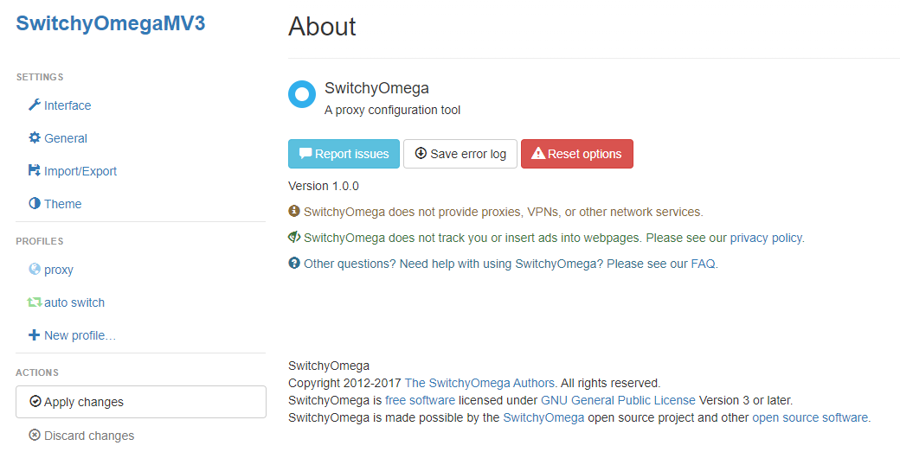
Through the above steps, you have successfully completed the integration of Firefox and proxy, which provides a more secure and flexible option for network connection.
Before integrating a proxy into Safari, make sure you have set up the proxy correctly to guarantee that the proxy service will work properly.
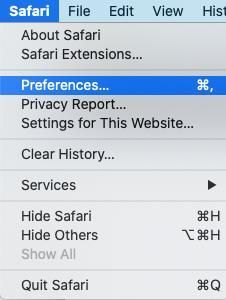
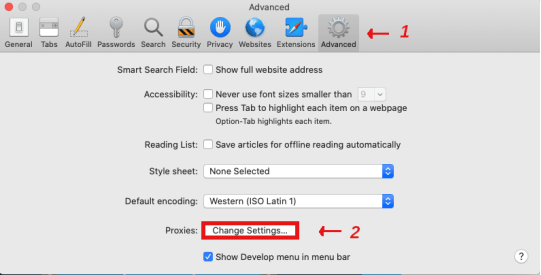
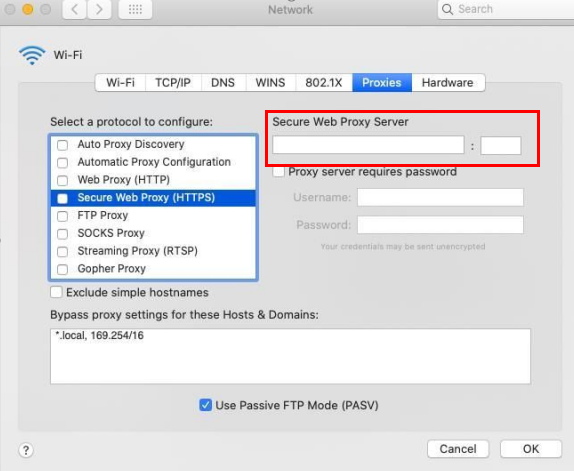
With the above steps, you have successfully completed the integration of Safari and proxy, which provides a more secure and flexible option for Internet connection.
Before integrating a proxy into BP Proxy Switcher, make sure you have set up the proxy correctly to guarantee that the proxy service will work properly.
Tips: Before using the plug-in, add the local IP address to the IP whitelist
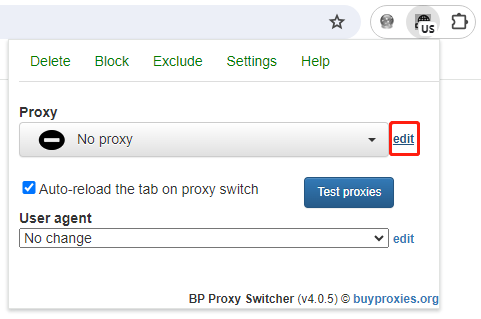
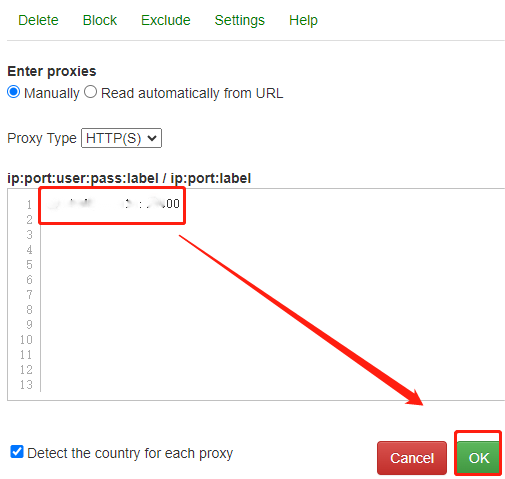
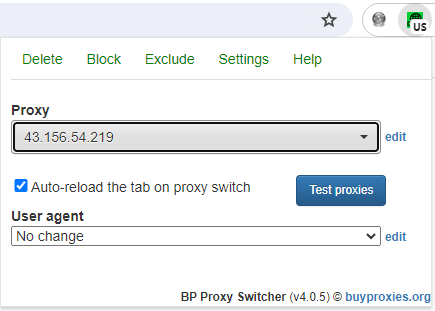
Through the above steps, you have successfully completed the integration of BP Proxy Switcher and proxy, which provides a more secure and flexible option for network connection.
Before integrating a proxy into Proxy Helper, make sure you have set up the proxy correctly to guarantee that the proxy service will work properly.
Tips: Before using the plug-in, add the local IP address to the IP whitelist
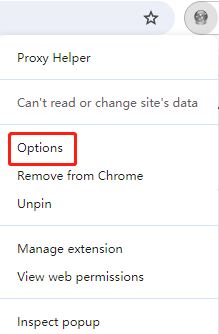
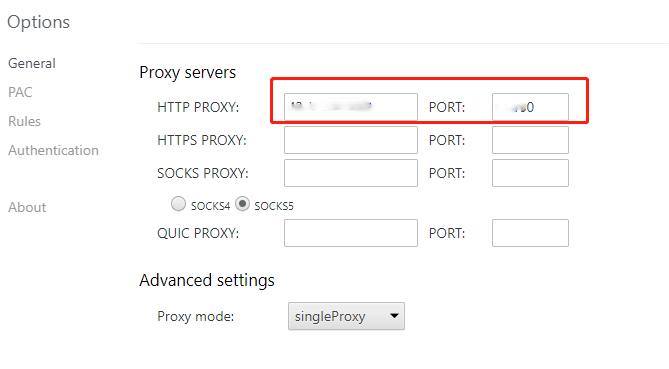
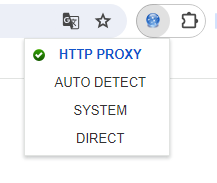
Through the above steps, you have successfully completed the integration of Proxy Helper and proxy, which provides a more secure and flexible option for network connection.
Before integrating a proxy into IPBurger Proxy & VPN, make sure you have set up the proxy correctly to guarantee that the proxy service will work properly. Click here to see how to set up the proxy.
Tips: Before using the plug-in, add the local IP address to the IP whitelist
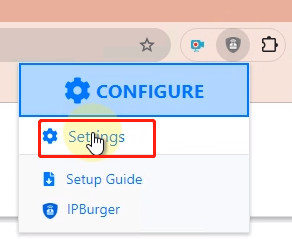
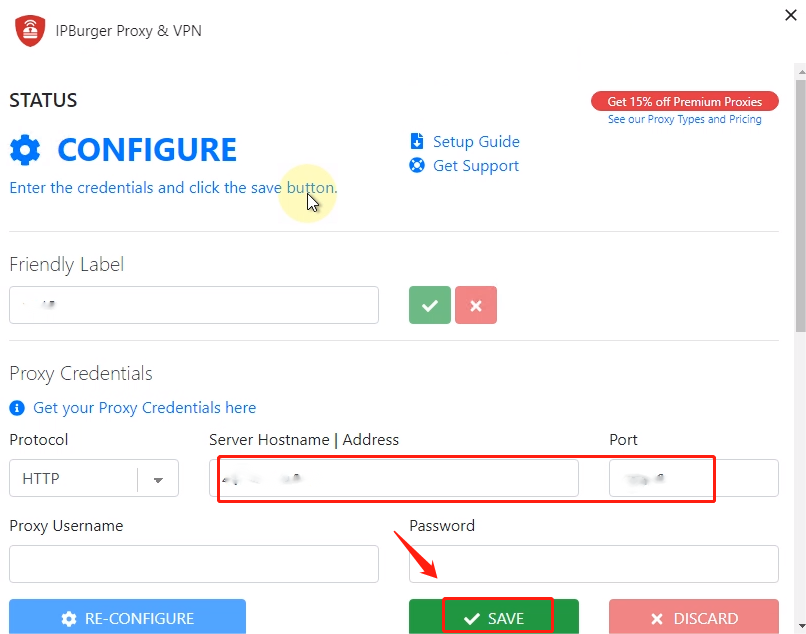
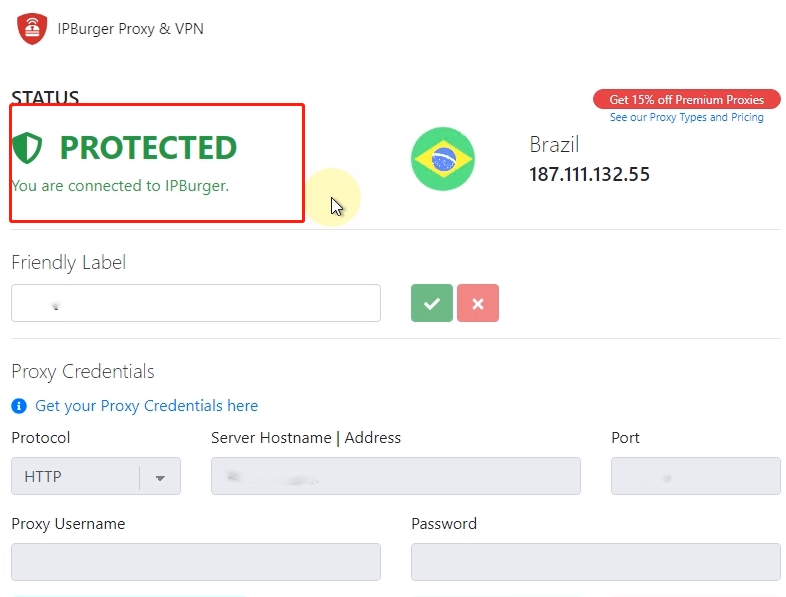
Through the above steps, you have successfully completed the integration of IPBurger Proxy & VPN and proxy, which provides a more secure and flexible option for network connection.
Before integrating a proxy into SwitchyOmega, make sure you have set up the proxy correctly to guarantee that the proxy service will work properly.
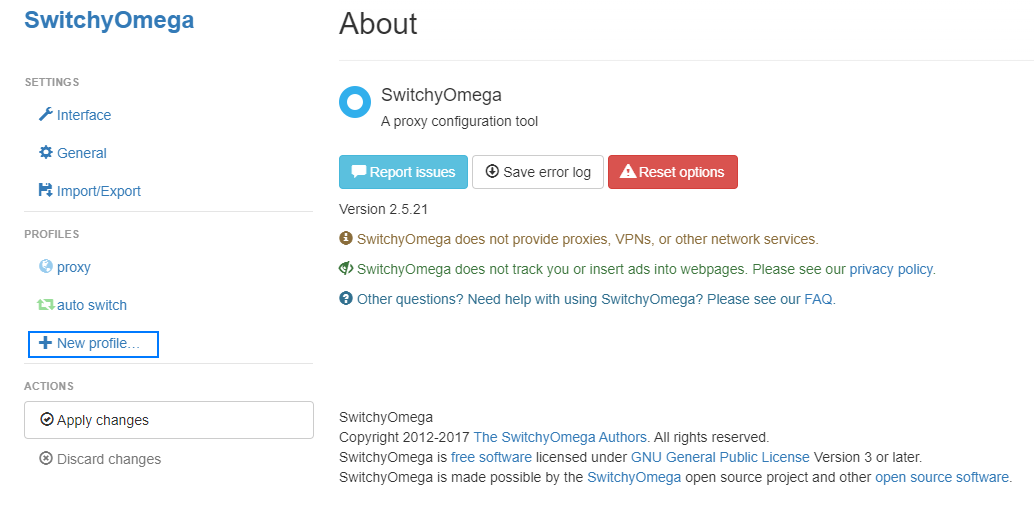
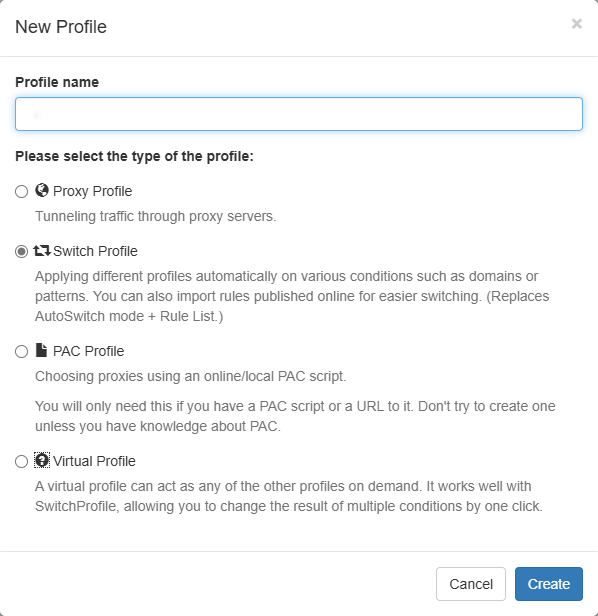
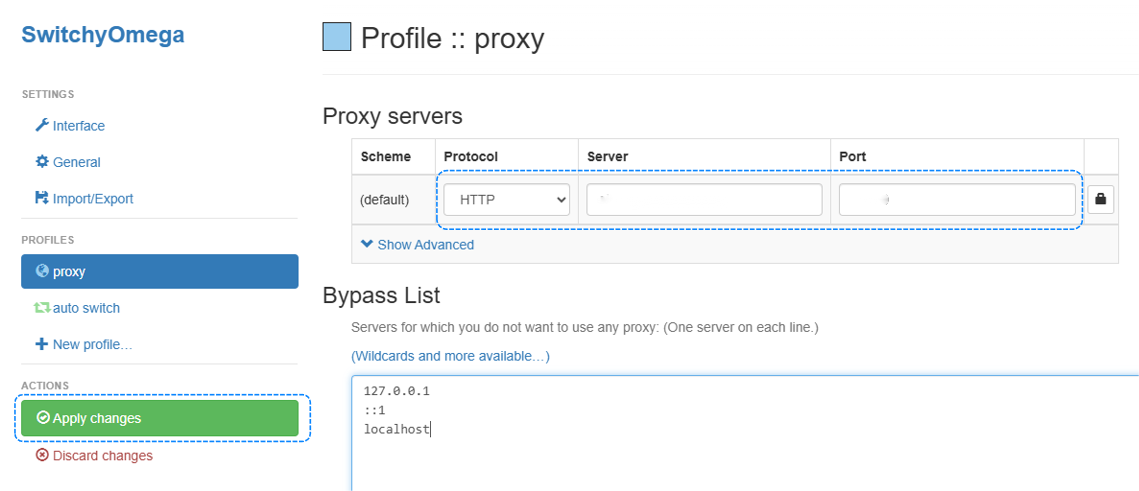
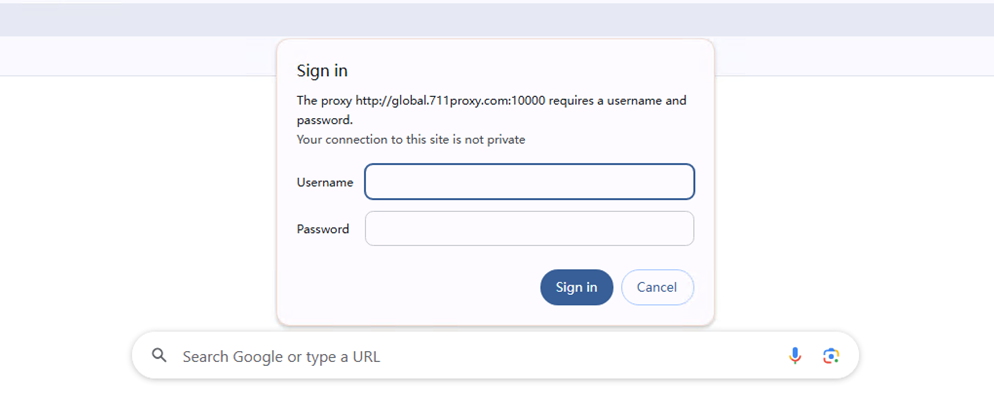
Through the above steps, you have successfully completed the integration of SwitchyOmega and proxy, providing a more secure and flexible option for network connection.
Before integrating a proxy into Edge, make sure you have set up the proxy correctly to guarantee that the proxy service will work properly.
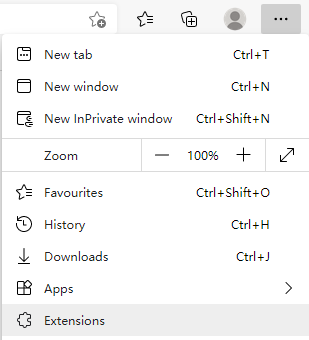
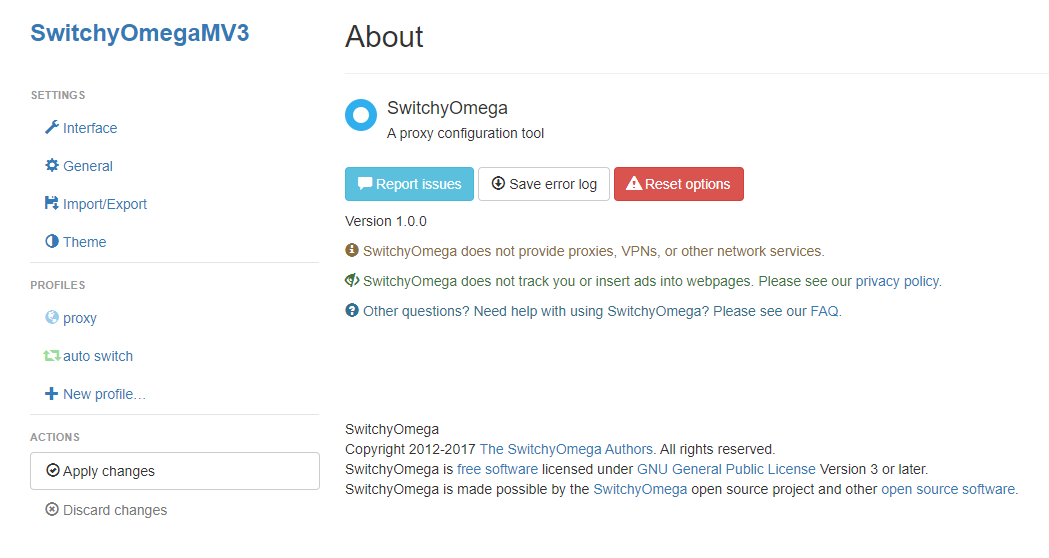
Through the above steps, you have successfully completed the integration of Edge and proxy, providing a more secure and flexible option for network connection.
Before integrating the proxy into Windows 10, make sure you have set up the proxy correctly to guarantee that the proxy service will work properly.
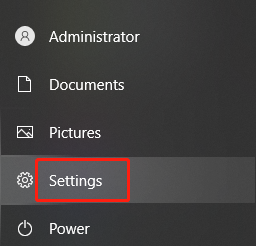
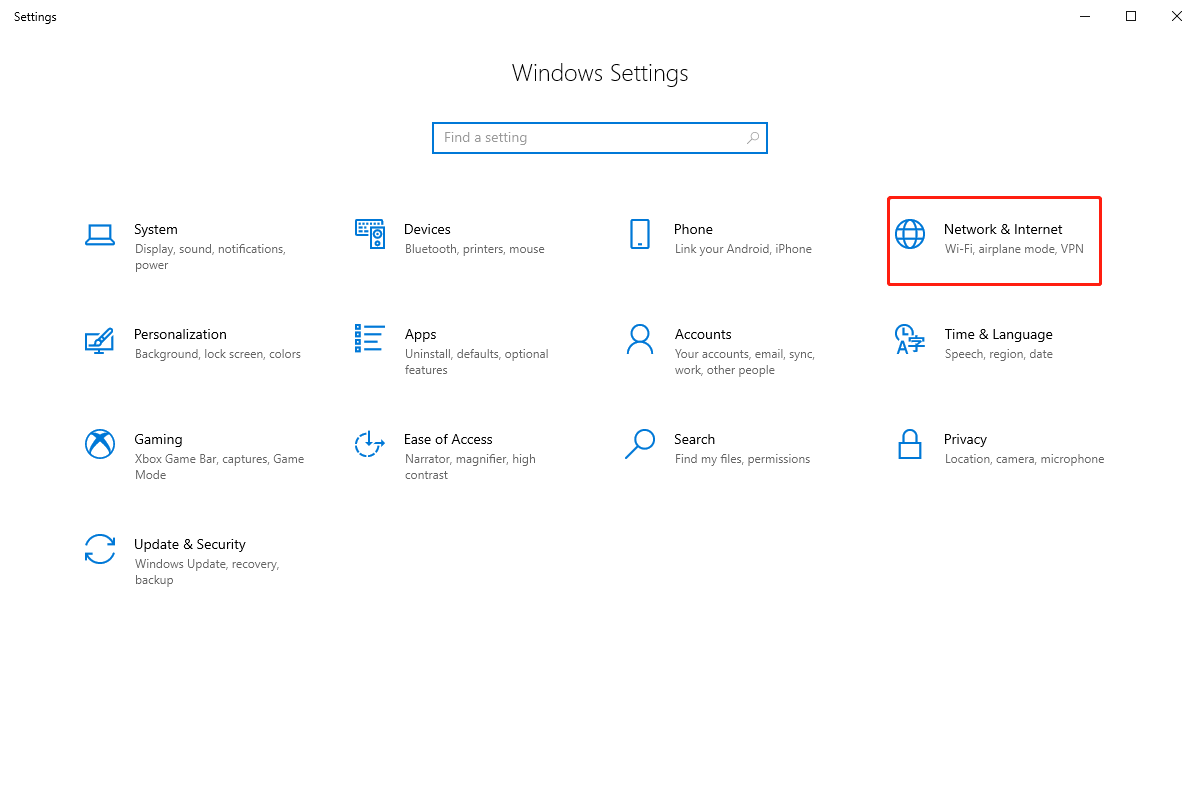
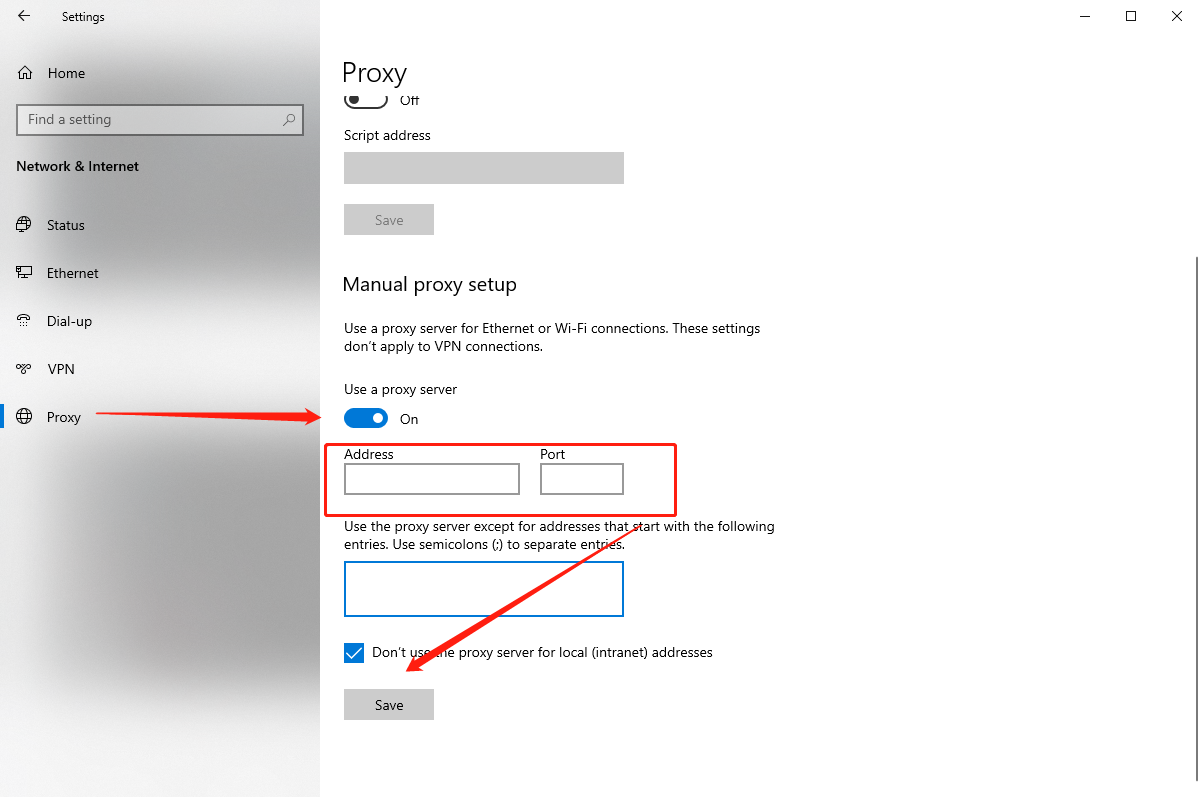
Through the above steps, you have successfully completed the integration of Windows 10 and proxy, providing a more secure and flexible option for network connection.
Before integrating the proxy into your Mac, make sure you have set up the proxy correctly to guarantee that the proxy service will work properly.
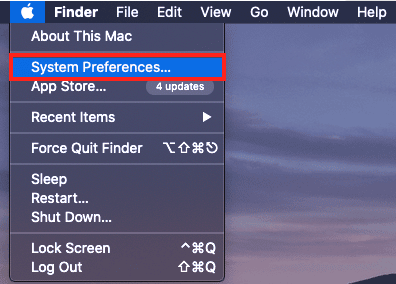
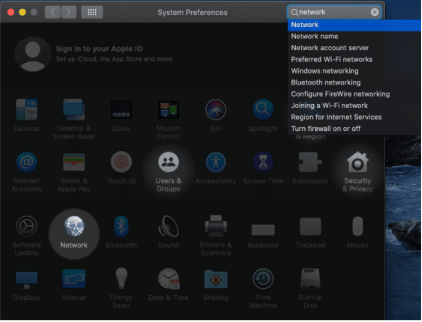
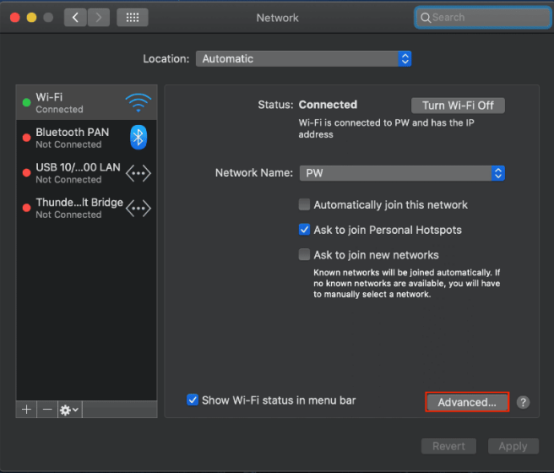
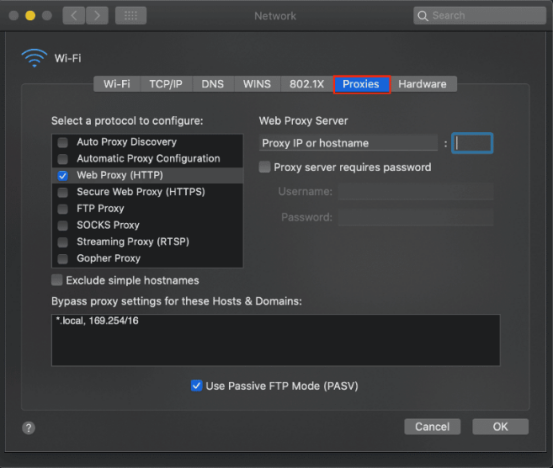
Through the above steps, you have successfully completed the integration of Mac and proxy, providing a more secure and flexible option for network connection.
Before integrating a proxy into Android, make sure you have set up the proxy correctly to guarantee that the proxy service will work properly.
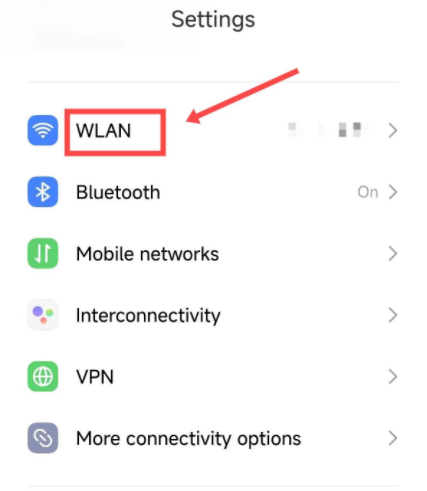
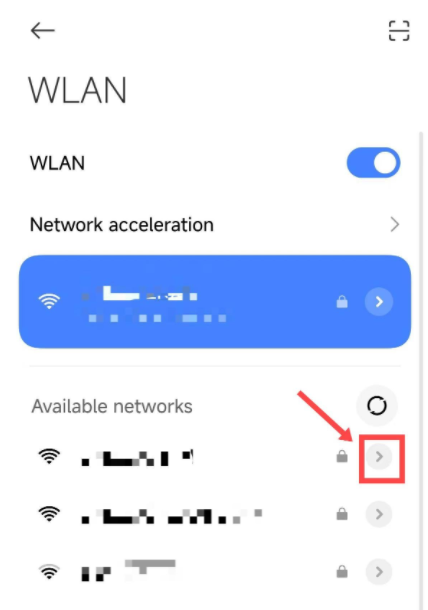
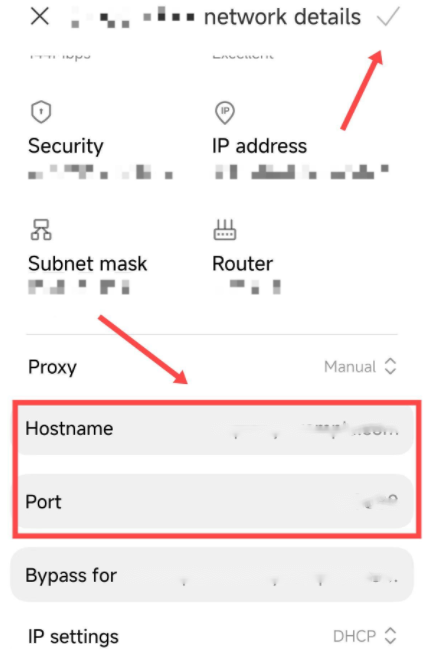
With the above steps, you have successfully completed the integration of Android and proxy, providing a more secure and flexible option for network connection.
Before integrating proxy into your iPhone, make sure that you have set up proxy correctly to ensure that the proxy service will work properly.
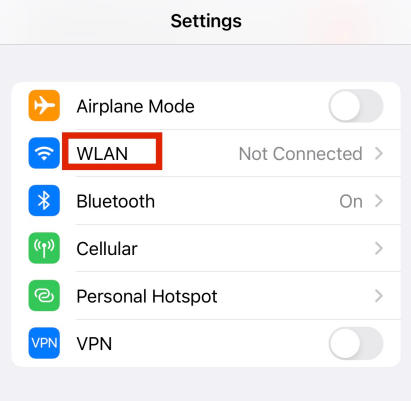
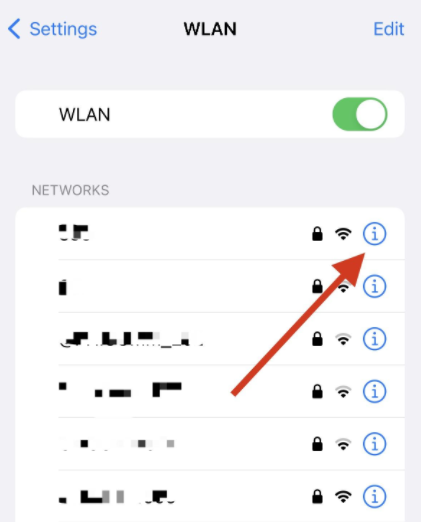
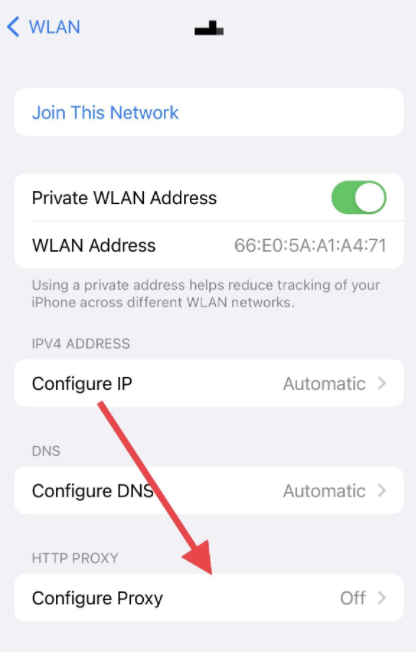
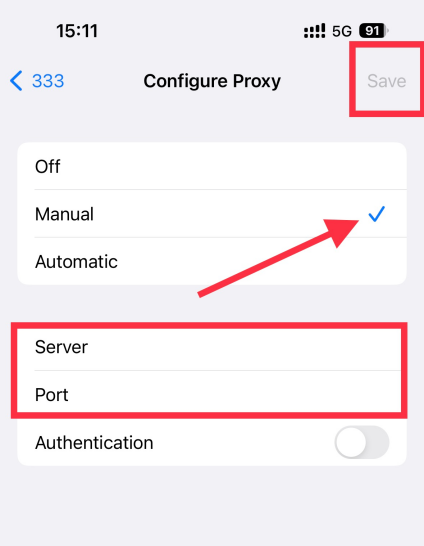
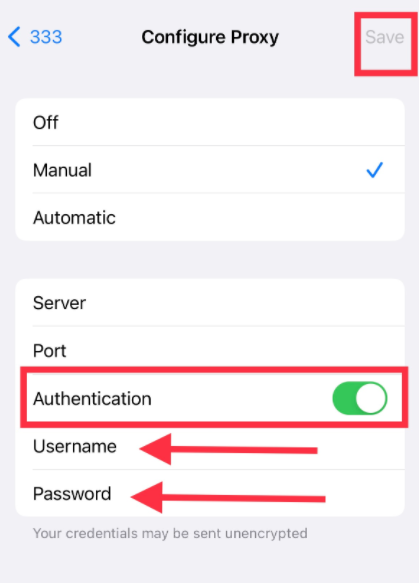
By following these steps, you've successfully integrated your iPhone with proxy, providing a more secure and flexible option for your network connection.
Before integrating a proxy into Stackposts, make sure you have set up the proxy correctly to guarantee that the proxy service will work properly.


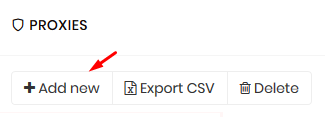
Follow the steps above and your proxy is now configured.
Before integrating a proxy into AIO Bot v2, make sure you have set up the proxy correctly to guarantee that the proxy service will work properly.
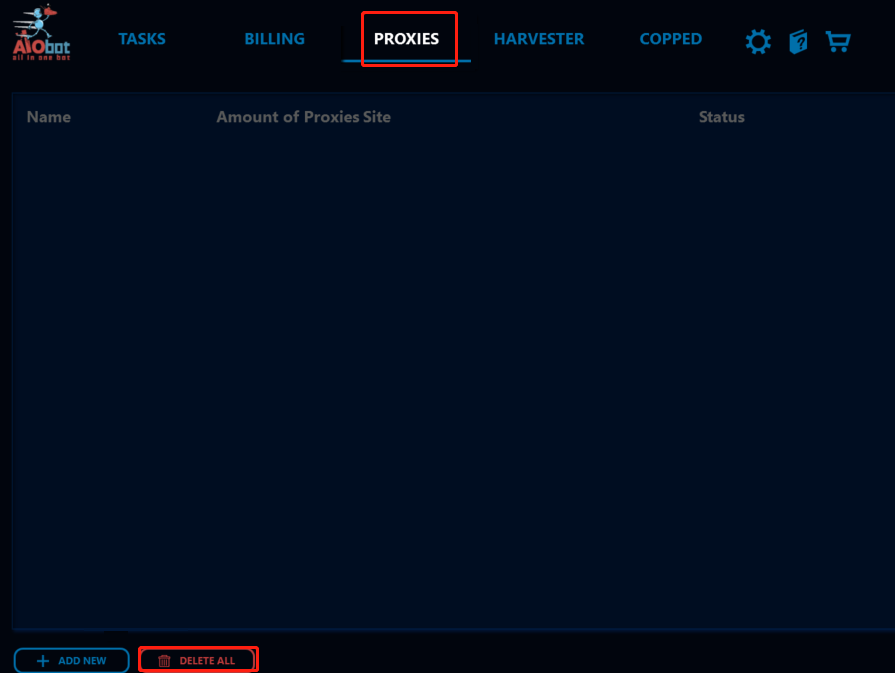
Follow the steps above and your proxy is now configured.
Before integrating a proxy into Another Nike Bot, make sure you have set up the proxy correctly to guarantee that the proxy service will work properly.
Follow the steps above and your proxy is now configured.
Before integrating a proxy into Nike Shoe Bot, make sure you have set up the proxy correctly to guarantee that the proxy service will work properly.
Follow the steps above and your proxy is now configured.
Before integrating a proxy into NikeSlayer, make sure you have set up the proxy correctly to guarantee that the proxy service will work properly.
Follow the steps above and your proxy is now configured.
Before integrating a proxy into AIO sneaker Bot, make sure you have set up the proxy correctly to guarantee that the proxy service will work properly.
Follow the steps above and your proxy is now configured.
Before integrating a proxy into EasyCop Bot, make sure you have set up the proxy correctly to guarantee that the proxy service will work properly.
Follow the steps above and your proxy is now configured.
Before integrating a proxy into Supreme Bot, make sure you have set up the proxy correctly to guarantee that the proxy service will work properly.
Follow the steps above and your proxy is now configured.
Before integrating a proxy into Better Nike Bot, make sure you have set up the proxy correctly to guarantee that the proxy service will work properly.
Follow the steps above and your proxy is now configured.
Before integrating a proxy into SENukeTNG, make sure you have set up the proxy correctly to guarantee that the proxy service will work properly.
Follow the steps above and your proxy is now configured.
Before integrating a proxy into Screaming Frog, make sure you have set up the proxy correctly to guarantee that the proxy service will work properly.
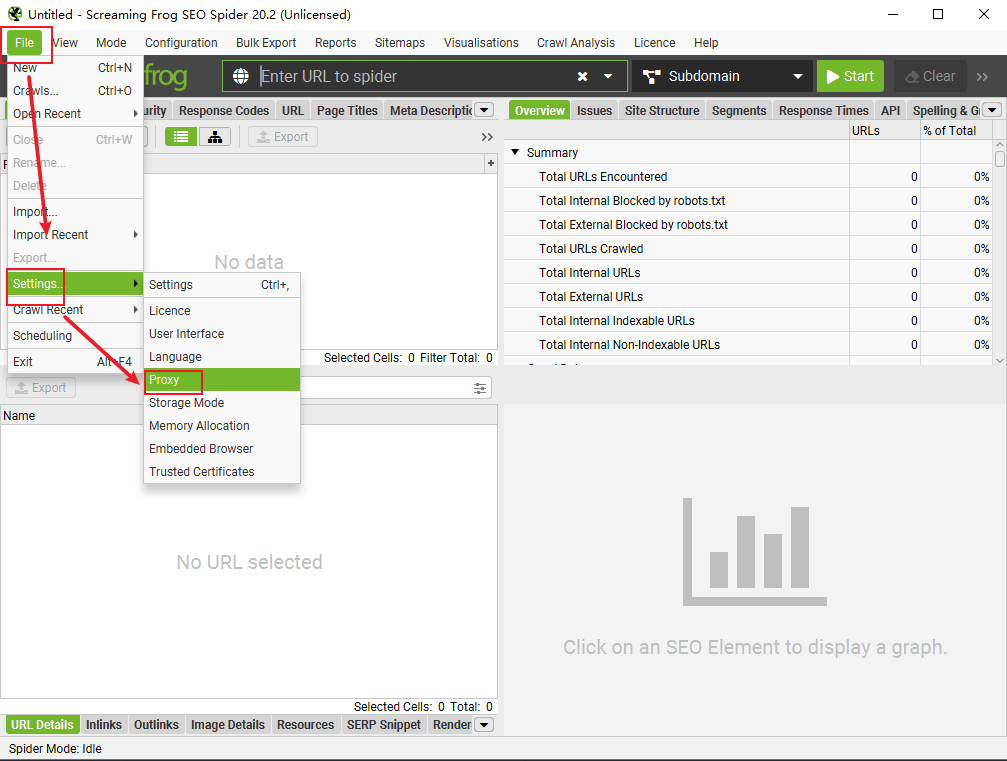
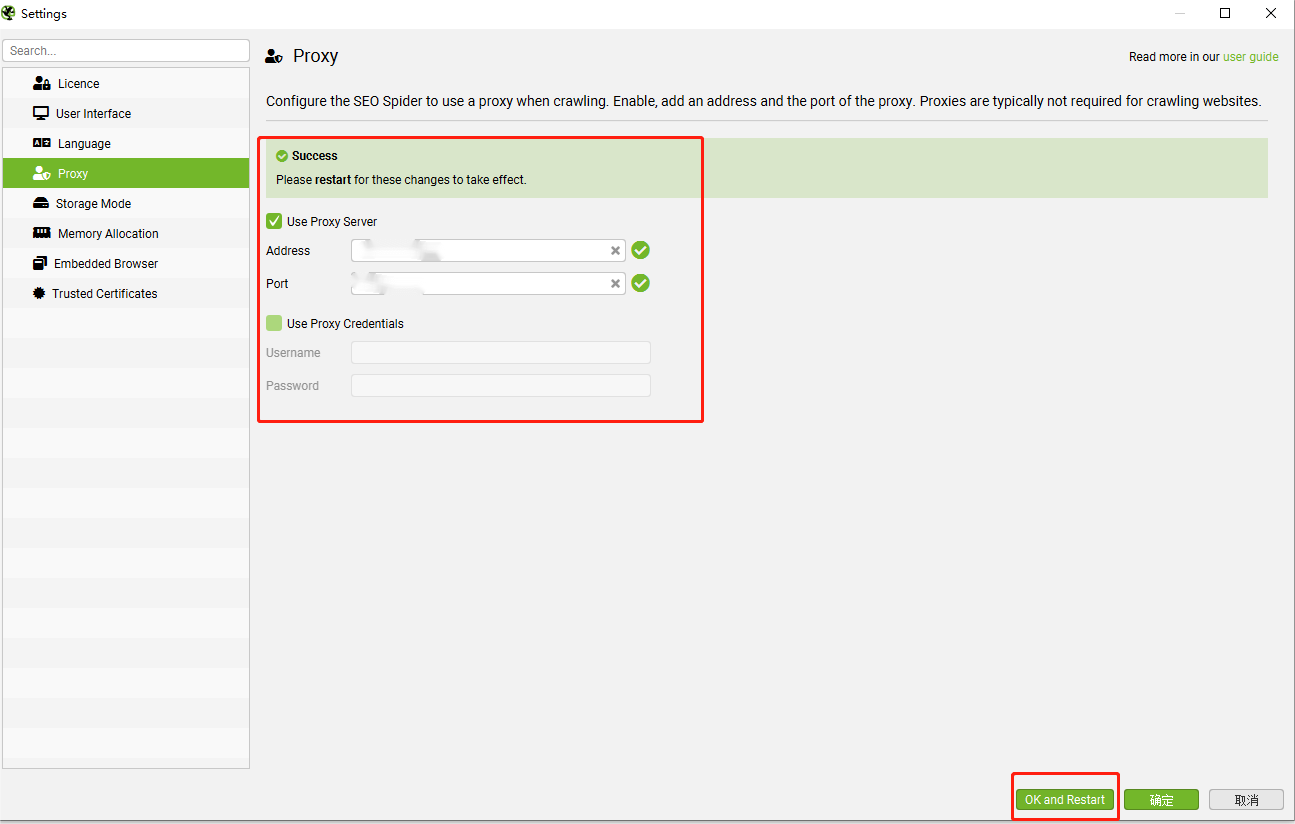
Follow the steps above and your proxy is now configured.
Before integrating a proxy into ZennoPoster, make sure you have set up the proxy correctly to guarantee that the proxy service will work properly.
Follow the steps above and your proxy is now configured.
Before integrating a proxy into Axios, make sure you have set up the proxy correctly to guarantee that the proxy service will work properly.
Follow the steps above and your proxy is now configured.
Before integrating a proxy into Parsehub, make sure you have set up the proxy correctly to guarantee that the proxy service will work properly. Click here to see how to set up the proxy.
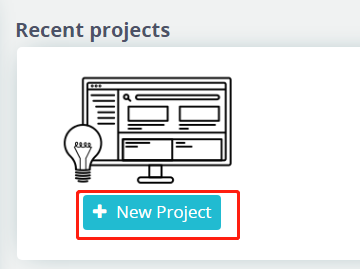
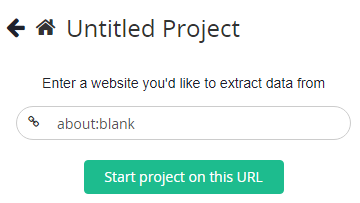

Follow the steps above and your proxy is now configured.
Before integrating a proxy into Octoparse, make sure you have set up the proxy correctly to guarantee that the proxy service will work properly.
Through the above steps, you have successfully completed the integration of Octoparse and proxy, which provides a more secure and flexible option for network connection.
Before integrating a proxy into Follow Liker, make sure you have set up the proxy correctly to ensure that the proxy service will work properly.
Through the above steps, you have successfully completed the integration of Follow Liker and proxy, which provides a more secure and flexible option for network connection.
Before integrating a proxy into PVACreator, make sure you have set up the proxy correctly to guarantee that the proxy service will work properly.
Through the above steps, you have successfully completed the integration of PVACreator and proxy, which provides a more secure and flexible option for network connection.
Before integrating a proxy into ScrapeBox, please make sure you have set up the proxy correctly to guarantee that the proxy service will run properly.
Through the above steps, you have successfully completed the integration of ScrapeBox and proxy, which provides a more secure and flexible option for network connection.
Before integrating the proxy with Apify, please make sure you have set up the proxy correctly to guarantee the proxy service will work properly. Click here to see how to set up the proxy.
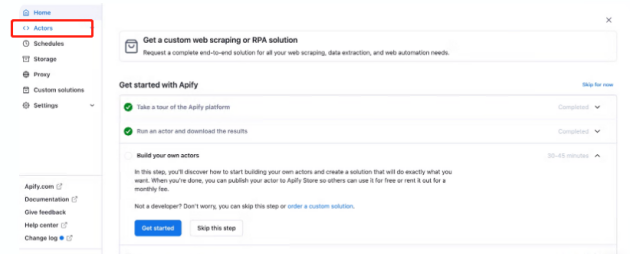
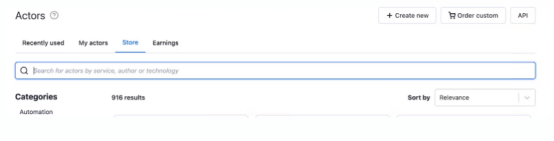
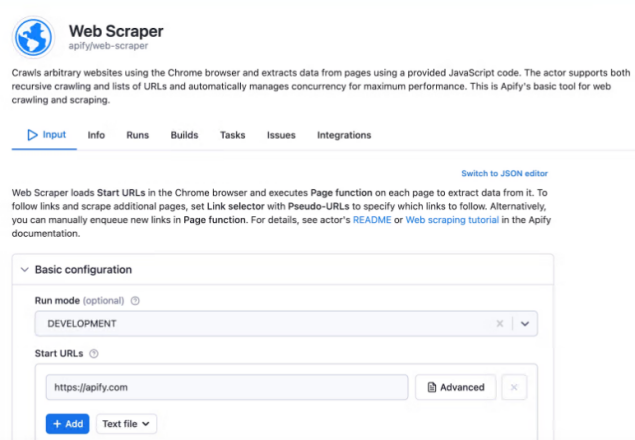
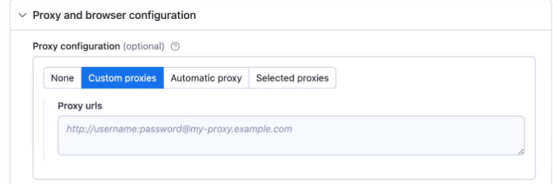
Through the above steps, you have successfully completed the integration of Apify and proxy, which provides a more secure and flexible option for network connection.